

You’re leading a growing business—maybe a manufacturing unit, a retail chain, or a service company. Every day, you juggle invoices, inventory counts, sales numbers, and customer requests. Your teams use multiple systems that don’t quite talk to each other, causing confusion, double entry, and missed opportunities. You want better visibility, smarter automation, and a future-proof platform—but it all sounds complicated and expensive.
What if there was an all-in-one system designed to simplify these headaches, streamline your operations, and grow with your business? Welcome to Microsoft Dynamics 365 Business Central.
This guide will take you through everything you need to know about Business Central in clear, plain English. Whether you’re considering it for the first time or looking to make the most of your existing setup, here’s your friendly roadmap.

Think of Business Central as your digital HQ—a cloud-based ERP (Enterprise Resource Planning) system that unites finance, sales, inventory, project management, and service under one roof.
Unlike patchwork software or separate apps, Business Central makes your data flow seamlessly so decisions are faster, errors fewer, and processes automated. It’s cloud-powered, easy to access from anywhere, and scales with your needs.


To understand why Business Central matters, imagine the common business struggles it solves:
Business Central answers these challenges by:
Imagine your business as a busy airport:
Business Central acts like the airport’s single control tower—a smart, cloud-connected system coordinating everyone in real time, reducing delays and errors.
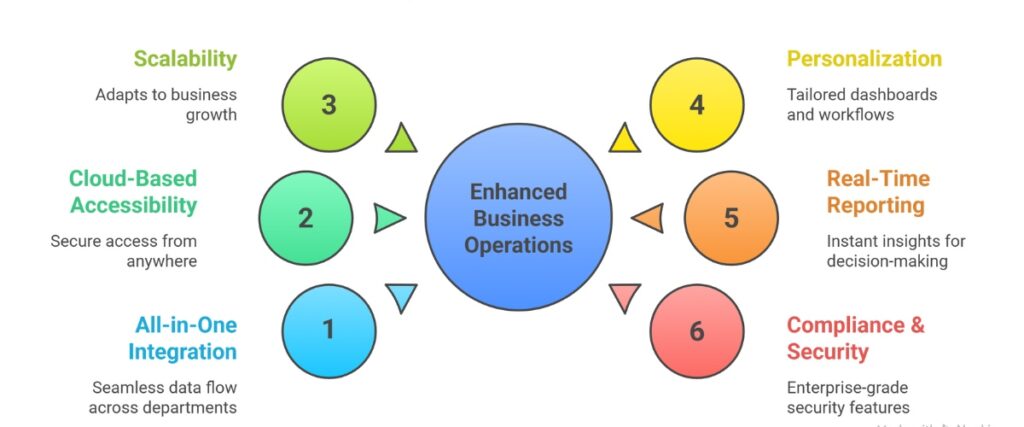
Data flows effortlessly between finance, sales, inventory, and projects. No disconnected spreadsheets or duplicate entries. This creates huge efficiency gains and fewer mistakes.
Access your business data securely from anywhere—office, home, or on the road—with updates delivered automatically. No heavy IT infrastructure needed.
Whether you have one location or dozens, Business Central adapts. Adding users, stores, or new modules is simple and often just a few clicks.
Tailor your dashboards, reports, and workflows to what matters most for your operations and roles. Custom extensions and Microsoft Power Platform integration extend capabilities.
Instant visibility into sales trends, cash flow, project progress, inventory levels, and staff performance enables smarter, quicker decisions.
Built on Microsoft Azure, it offers enterprise-grade security, data privacy compliance, and audit-ready features designed for local regulations around the world.




| Pros | Potential Challenges |
|---|---|
| Intuitive user interface with strong Microsoft 365 integration. | Initial setup and customization require planning and expertise. |
| Flexible pricing and modular licensing. | Change management necessary for staff adoption. |
| Strong ecosystem of Microsoft partners and third-party extensions. | Some advanced features may need partner help or development. |
| Rapid deployability, cloud-first with offline capability. | Performance for very large enterprises may require specific architecture considerations. |
| Frequent feature updates and enhancements. |
Microsoft Dynamics 365 Business Central isn’t just another software—it’s a platform for growth, efficiency, and innovation. By unifying your back office and operations with real-time insight and automation, you free your team to focus on what really matters: serving customers, innovating products, and expanding your business.
Next step: Make a checklist of your biggest business challenges and reach out to a Microsoft partner to explore how Business Central can solve them. Whether you’re aiming to streamline finances, boost inventory accuracy, or unlock new sales channels, the right ERP system can be your competitive edge.
Technology should simplify, not complicate. Business Central brings clarity to complexity and helps your business thrive in today’s fast-paced world. Ready to explore how Business Central fits your business? Let’s start the conversation today!
Business Central is a cloud-based ERP solution that unifies finance, sales, inventory, project management, and service into one integrated platform designed for growing businesses.
It improves operational efficiency by centralizing data, automating tasks, providing real-time insights, and enabling scalable growth with flexible cloud access.
Yes. It scales easily for businesses of all sizes, from single locations to multi-site enterprises.
Core features include finance management, sales and marketing, inventory control, project and service management, and powerful reporting with embedded AI.
Absolutely. It seamlessly integrates with Microsoft 365 tools (like Outlook, Excel) and supports extensions and APIs for third-party apps.
Yes, users can personalize interfaces with minimal technical skills, and advanced customizations are possible through extensions and partner-developed add-ons.
Hosted on Microsoft Azure, it provides enterprise-grade security, compliance certifications, data encryption, and continuous updates to protect your information.
Implementation involves planning, configuration, data migration, training, testing, go-live, and ongoing optimization, often with the help of certified Microsoft partners.