

Your business is growing steadily—or maybe even rapidly. Every day, more transactions, invoices, project documents, and records pile up in your system. The files get heavier, your database slows down, and navigating old records starts to feel like digging through endless paperwork. Meanwhile, strict compliance requirements mean you must keep every document accessible and accurate for audits, tax reporting, and business decisions. It’s frustrating, time-consuming, and costly.
This is a reality many companies face—and one that Microsoft Dynamics 365 Business Central’s archiving capabilities are designed to solve.
Simply put, archiving in Business Central means moving older, less-frequently-used data out of your active system into a safe, compressed place where it’s still accessible but doesn’t slow down your day-to-day operations.
Think of it as creating a clean, organized attic for your important historical files. You don’t throw them away—you just store them intelligently so the main office stays tidy and efficient.

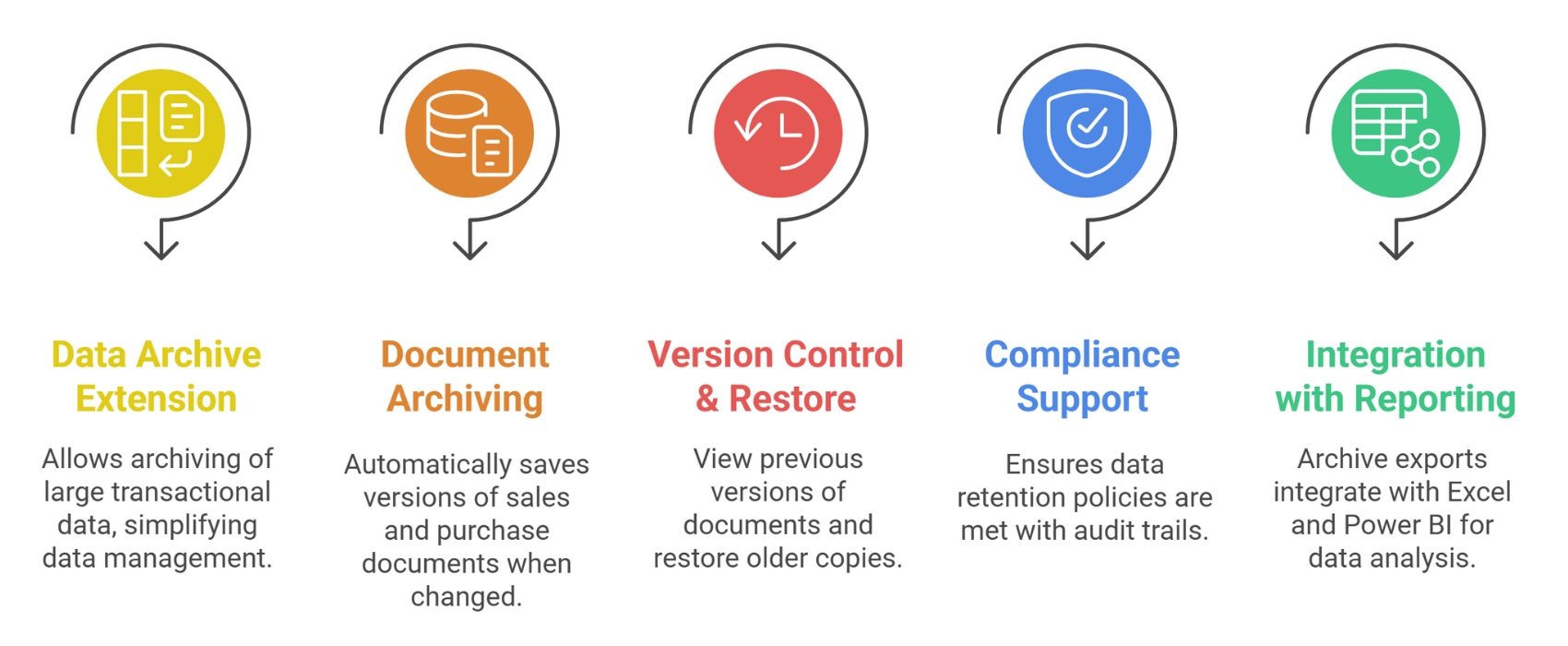
Business Central lets you archive various data types: ledger entries, sales and purchase documents, project records, service contracts, and more. You usually archive older, closed fiscal year data or documents no longer actively used.

Instead of keeping every individual ledger line or document version live, Business Central groups and compresses these records, reducing space and improving access speed.

Archived data stays available inside Business Central via special extensions—no need to juggle external databases. This means you can review or export this data for audits or business insights anytime.

Business Central’s archiving captures changes, printed copies, approvals, or status updates on documents over time, ensuring full traceability and compliance.

If you ever need to revisit a past version of a project or a document, it’s right there. Plus, archived data can be exported to Excel or CSV, letting you analyze it with tools like Microsoft Power BI.
moves older data out of the active system into a compressed, accessible repository. It’s about long-term storage of historical records and audit readiness.
condenses ledger entries and records within the system, reducing the size of active tables while retaining summarized information. It improves performance and storage efficiency on an ongoing basis.
Both are complementary tools: compression keeps your day-to-day system lean, archiving stores historical data you rarely need but must retain.

Here are some typical triggers to consider archiving:
| Benefit | Why It Matters |
|---|---|
| Faster ERP Performance | Reduces load on live system tables, speeding up queries and transactions. |
| Lower Cloud Storage Costs | Efficient use of storage reduces monthly expenses in cloud deployments. |
| Enhanced Compliance | Keeps traceable, unaltered records needed for audits and legal mandates. |
| Reduced IT Maintenance | Streamlines database management—less backup time and fewer issues. |
| Scalability for Growth | Keeps your ERP ready the moment business expands or data volumes rise. |
Regular archiving helps keep your Business Central system clean and fast. When old data is removed from daily workflows, pages load quicker and users find what they need without delays. Archiving also reduces storage pressure and keeps your system organised over time. Most importantly, it ensures that important records are still safely available whenever you need them for audits, reviews, or reports. With a simple archiving routine, businesses can maintain better performance and stay compliant without extra effort.

Plan your data archiving strategy
Decide which data to archive, frequency, and retention policies aligned with business and compliance needs.Use Business Central’s built-in tools and extensions
Test with a pilot phase
Archive a subset of data, verify access, reporting, and restore capabilities before broad rollout.Train your team
Make sure financial controllers, auditors, and operations staff understand how to access archived data.Monitor and adjust
Regularly review data growth, archive success, and system performance; refine your schedules and policies as needed.| Challenge | How to Overcome |
|---|---|
| Fear of losing access to data | Use Business Central’s accessible archive storage and reporting tools. |
| Complexity in setup | Work with certified Microsoft partners to guide your strategy and rollout. |
| User resistance | Offer training and emphasize benefits: faster system, easier audits. |
| Compliance concerns | Document archiving ensures full traceability and audit trails. |
| Managing mixed on-prem/cloud environments | Business Central supports hybrid archiving workflows to suit your deployment. |
A retail chain with 50 stores faced sluggish system performance and increasing storage costs due to years of transaction data. By implementing Business Central’s Data Archive, they:
The transition was smooth and their staff appreciated how archived data remained easy to query and export when needed.
In today’s fast-paced, data-driven world, keeping your Business Central system lean and efficient is not a luxury—it’s a necessity. Without smart archiving, growing piles of historical data can weigh down your ERP system, slow down daily tasks, spike costs, and complicate compliance.
Microsoft Dynamics 365 Business Central’s archiving capabilities give you the best of both worlds: a fast, agile daily system plus easy access to every record—old or new—whenever you need it.
By building a thoughtful archiving strategy, leveraging Business Central’s native tools, and partnering with experts, you can unlock:
Ready to take control of your data and performance? Start by evaluating your current data volume and retention needs, explore Business Central’s archiving extensions, and connect with a trusted Microsoft partner for tailored guidance.
Make archival excellence part of your business growth story—because smart decisions start with smart data management.