

You’re a business owner or manager in Australia exploring ways to modernize your operations with an ERP system. You’ve heard great things about Microsoft Dynamics 365 Business Central—its powerful features, cloud flexibility, and strong integration with Microsoft 365. But then comes the big question: How much will it cost? And perhaps just as important: What pricing structure makes sense for my business?
Navigating ERP pricing can feel tricky, with various licensing models, add-ons, and user types to consider. But understanding how Microsoft structures Business Central pricing in Australia can help you budget smartly, avoid surprises, and choose a plan that scales with your business growth.
In this blog, we’ll break down everything you need to know about Dynamics 365 Business Central pricing in Australia—clear, straightforward, and business-focused.
Microsoft Dynamics 365 Business Central is offered mostly as a cloud-based subscription service with monthly licensing fees. This means you pay for access to the software (and updates) as a service, rather than a hefty one-time purchase.
Pricing is primarily based on:
Unlike traditional ERP models with large upfront licenses and ongoing maintenance fees, Business Central’s subscription model spreads costs predictably over time and lowers your initial investment.
Microsoft organizes Business Central pricing into two main user license types:

Perfect for businesses with core financial, sales, and operational needs.
Features include:
The Essentials plan generally covers most small to medium businesses with standard ERP requirements.

Includes all Essentials features plus:
Ideal for companies with complex manufacturing processes or service operations integrated into the ERP.

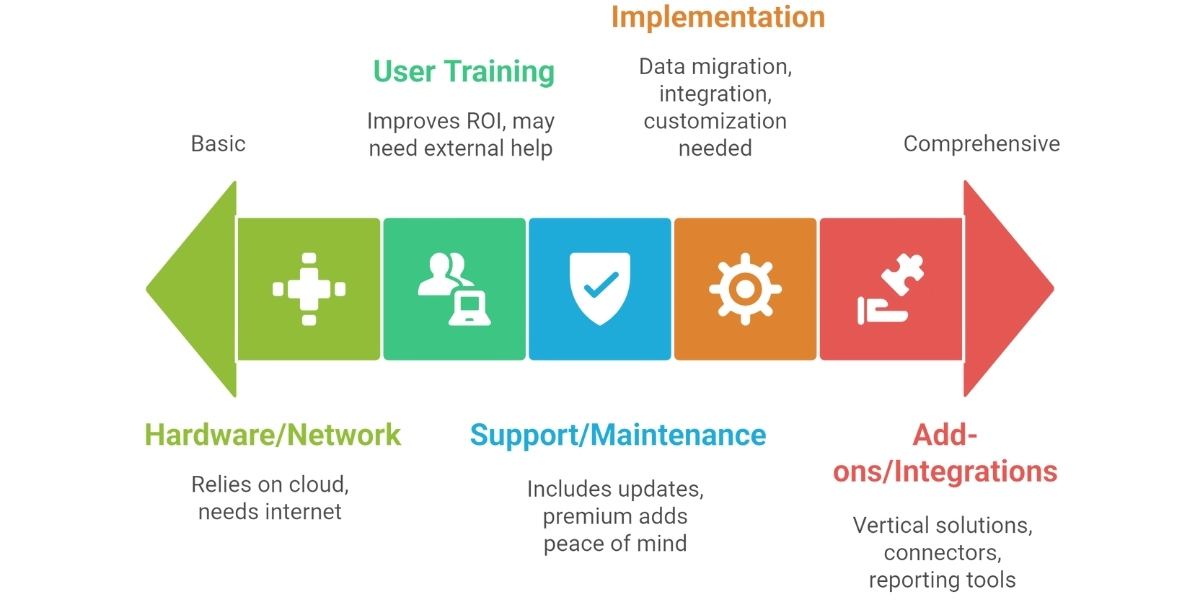
While the monthly license fees for Business Central (Essentials, Premium, Team Member) form the bulk of the cost, there are several “hidden” cost drivers that can significantly impact your total spend:
Implementation & Consulting Fees: Beyond licensing, the cost to set up Business Central — including data migration, customizations, integrations, and training — can add up quickly.
Partner Services: Working with a Microsoft partner often improves your deployment, but their pricing depends on the complexity of your business and the number of users.
Add-ons & Extensions: Industry-specific modules, third-party add-ons, or Power Platform integrations can add recurring monthly costs.
Support & Maintenance: While the cloud model includes Microsoft updates, additional support (premier partner support, dedicated resource) comes at a price.
Training: Depending on how many users you have and how deeply you customize BC, training costs can be non-trivial.
Storage & Data Growth: As your business grows, more data means more storage needs (especially for on-premises or hybrid models), which has cost implications.
By planning for these cost drivers up front, you can build a more realistic budget and avoid surprises later.
Microsoft does not publicly publish exact pricing for every country due to local taxation and reseller variations. However, based on known global trends and Australian reseller insight, here’s a rough idea:
| License Type | Monthly Price (Per User) | Best For |
|---|---|---|
| Essentials | AUD 85 – 100 | Most SME customers with core financial and operational needs |
| Premium | AUD 125 – 150 | Businesses requiring manufacturing or service modules |
| Team Members (Light User) | AUD 10 – 15 | Users with limited usage like read-only or light data entry |
Note: Team Members licenses are for users who need only limited access—for example, to view reports or approve workflows, but not full ERP functions.
Think of Business Central pricing like a mobile phone plan:
Selecting the right plan and the number of users is like picking the right phone plan for your company—enough bandwidth without paying for features you don’t need.
| Pros | Cons |
|---|---|
| Predictable monthly costs | Ongoing subscription costs over time |
| Lower upfront investment | Cost can increase with business growth and users |
| Always up-to-date software | Dependence on internet connectivity |
| Scales easily with your business | Implementation costs are additional upfront |
| Access from anywhere, anytime | May require partner assistance to optimize |
While the cloud subscription is the dominant model, some Australian businesses may still opt for on-premises deployments. Pricing for this model typically involves:
On-premises models tend to have higher upfront costs and IT overhead but may suit certain businesses with tight data control requirements.

Choosing an ERP system like Business Central is an investment in your business’s future efficiency and growth. Understanding the pricing structure, license types, and total cost factors helps you plan confidently.
Remember:
With clear understanding and smart planning, Microsoft Dynamics 365 Business Central pricing in Australia can fit your business perfectly—delivering high value, cloud agility, and scalable growth—all while keeping costs manageable and predictable.
Ready to take your business to the next level with Business Central? Reach out to a Microsoft partner today and turn your ERP vision into reality.
Pricing varies by license type. On average, Essentials licenses cost around AUD $100–$120 per user/month, Premium licenses about AUD $150–$180 per user/month, and Team Members licenses $15–$25 per user/month (excluding GST)
Essentials covers core finance, sales, purchasing, inventory, and basic project management. Premium includes all Essentials features plus manufacturing and service management capabilities.
Yes. Implementation, data migration, training, customizations, and ongoing support are separate from the monthly subscription.
These are for light users who only need limited access, like viewing reports, approving workflows, or entering timesheets.
License fees are typically quoted excluding GST, so you’ll need to add 10% GST for Australian businesses.
Yes, on-premises perpetual licenses are available, but they require higher upfront costs and ongoing maintenance.
Right-sizing user licenses, starting with Essentials, leveraging Microsoft promotions, and bundling services with a partner can reduce costs.
Yes, it supports GST/BAS reporting, Single Touch Payroll integrations, Australian bank file formats, and other local compliance standards.