
It is Tuesday morning. Your operations manager is chasing three suppliers for delivery confirmations, none of which exist in your system. Your finance lead is in the middle of month-end and has already found two sets of numbers that do not match one in the accounting software, one in the spreadsheet your warehouse team has been maintaining on the side. Meanwhile, a long-standing customer calls asking about an order status that nobody can locate without digging through three different places.
Sound familiar? If you are running an Australian SMB with somewhere between 15 and 150 people, this kind of day is not unusual. It is not a people problem or a process problem it is a systems problem. And it is costing your business more than you realise.
The businesses that break out of this cycle are not the ones that hire more people or work longer hours. They are the ones that invest in the right foundation a single, connected business management platform that gives every team the information they need, when they need it, without the manual glue holding it all together.
Australian small and midsize businesses are at an inflection point. Many have grown quickly over the past five years adding staff, locations, product lines and customers. But their technology has not kept pace. The result is a familiar pattern: a patchwork of tools that each do one thing adequately but do not talk to each other.
MYOB or Xero handles the books. A separate system manages inventory. The sales team lives in spreadsheets. Project timelines are tracked in a mix of email threads and shared documents. And somewhere in the middle of all of it, someone is manually copying data from one place to another introducing errors at every step.
This is not a failure of ambition. It is the natural consequence of growth outpacing infrastructure. And the longer it continues, the more expensive it becomes to fix.
Most businesses underestimate what fragmented systems actually cost them. The obvious costs are easy to see — time spent on manual data entry, errors that need correcting, reports that take days instead of minutes. But the invisible costs are often larger.
| Hidden Cost | What It Looks Like in Your Business | Business Impact |
|---|---|---|
| Slow decision-making | Waiting until end of month to see real financial position | Missed opportunities, reactive not proactive strategy |
| Inventory blind spots | Overselling stock you do not have, or holding too much of what you do | Customer complaints, tied-up cash, write-offs |
| Reconciliation drain | Finance team spending 2–3 days reconciling data from multiple sources | High labour cost for low-value work, morale drain |
| Compliance exposure | No clear audit trail across departments, manual GST and payroll entries | ATO audit risk, reporting errors, governance gaps |
| Onboarding drag | New staff learn 4–5 disconnected systems instead of one | Longer ramp-up time, inconsistent process adoption |
| Growth ceiling | Cannot add a new location or product line without breaking existing processes | Constrained growth, leadership time consumed by operations |
The businesses we work with most often describe the moment they knew they needed to change: not a single dramatic event, but a slow accumulation of small frustrations until the cost of staying the same became greater than the cost of changing.
This guide is written for operations managers, finance leads, business owners and managing directors at Australian SMBs typically businesses with 10 to 200 staff who are outgrowing their current software and exploring whether ERP is the right next step. If you are running on MYOB, Xero, QuickBooks or a mix of disconnected tools and finding it increasingly difficult to get a clear picture of your business, this is for you.
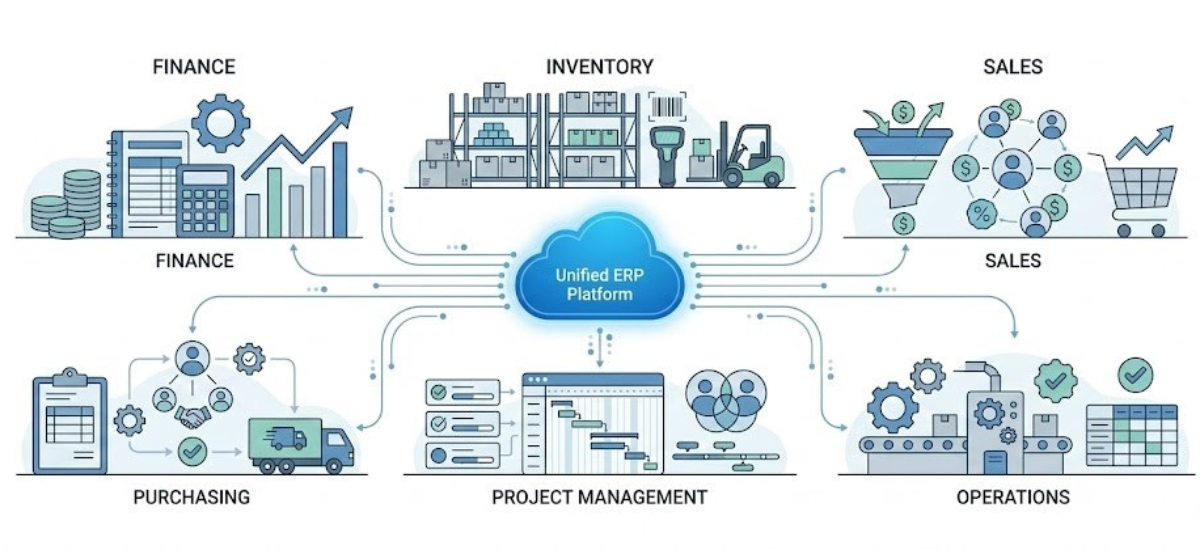
Microsoft Dynamics 365 Business Central is Microsoft’s cloud-based Enterprise Resource Planning (ERP) platform built specifically for small and midsize businesses. At its core, it is a single, connected system that replaces the patchwork of disconnected tools most growing businesses rely on unifying your finance, inventory, sales, purchasing, projects and operations under one roof.
Unlike accounting software that manages your books, Business Central manages your entire business. It connects every department, automates the processes that consume your team’s time and gives you a real-time view of how your business is performing at any given moment from cash flow and profitability to stock levels and customer order status.
The most common misconception we hear from Australian SMBs is that Business Central is “expensive accounting software.” It is not. Accounting software even excellent products like MYOB and Xero is built to manage your financial records. Business Central is built to manage your entire operation.
The distinction matters because the problems most growing businesses experience are not purely financial. They are operational — disconnected departments, manual handoffs between teams, inventory that does not sync with invoicing, projects that run over budget because nobody has a live view of costs. Business Central addresses all of these, not just the ledger.
Streamline supermarket operations with industry-focused ERP capabilities designed for complex retail environments.
Improve food operations with stronger traceability, compliance controls and visibility across the supply chain.
Connect production planning, materials and shop-floor operations through a centralised manufacturing ERP platform.
Manage large field teams with connected scheduling, dispatch and mobile service workflows.
Gain better control over project finances, subcontractors and construction costs with integrated ERP workflows.
Business Central is part of the broader Microsoft ecosystem which means it integrates natively with Outlook, Teams, Excel and Power BI. For most Australian businesses, that means your team is already familiar with the interface and the learning curve is significantly lower than switching to an entirely foreign platform.

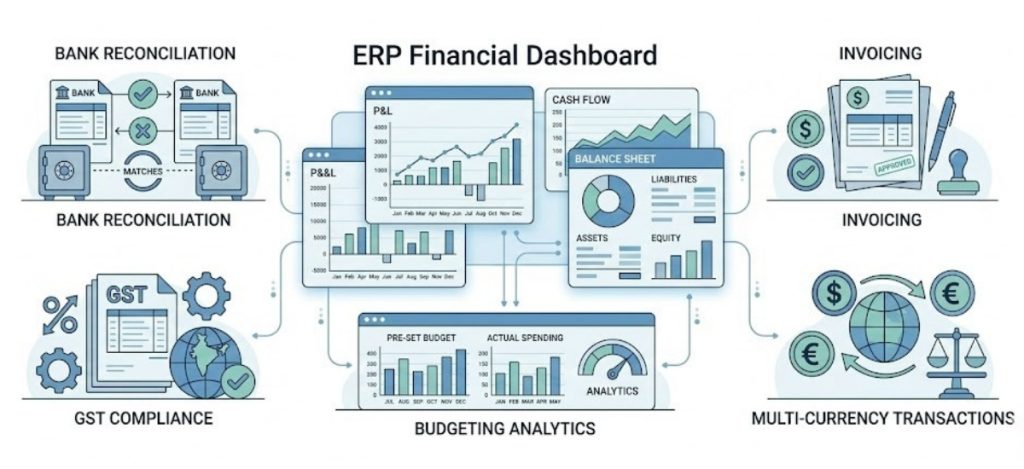
At its financial core, Business Central automates the processes that currently consume your finance team’s time. Bank reconciliation runs against live transaction feeds. Invoices are generated and dispatched directly from the system. GST calculations, payment terms and approval workflows are built in and consistent across every transaction.
Where Business Central goes beyond accounting software is in the reporting layer. Rather than pulling data from three systems and assembling a report in Excel, your finance lead can see a live dashboard showing cash flow position, aged receivables, profitability by product or project and budget vs actuals at any point in the month, not just at the end of it.
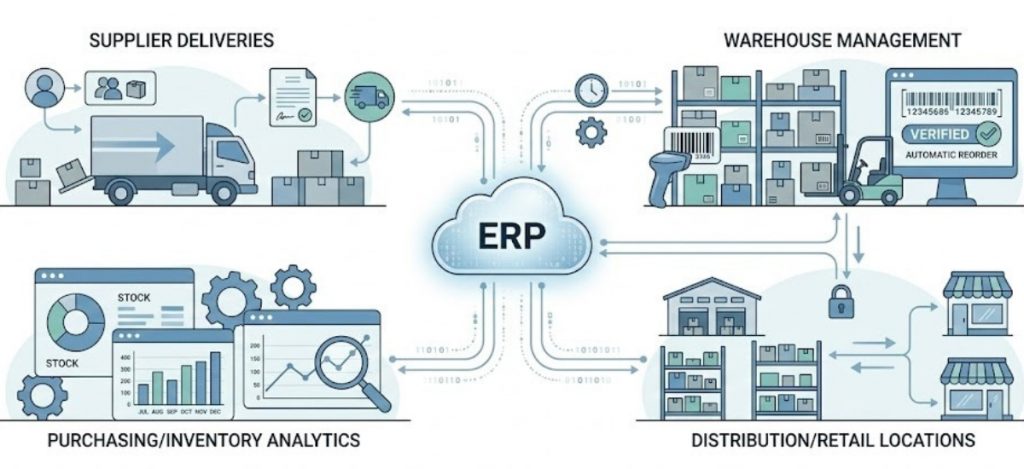
For product-based businesses whether you are in wholesale distribution, manufacturing or retail inventory accuracy is non-negotiable. Business Central gives you live visibility of stock levels across every location, with automated reorder rules that trigger purchase orders before shortfalls occur.
Every goods receipt, transfer, adjustment and sale updates your inventory record in real time. That means your sales team can quote accurately, your warehouse can fulfil without surprises and your finance team has a true cost of goods at any given moment.
For businesses in food and beverage manufacturing or other regulated sectors, traceability is an added benefit — every item can be tracked from supplier through to customer with a full audit trail.
automation capabilities that make Business Central ideal for SMBs
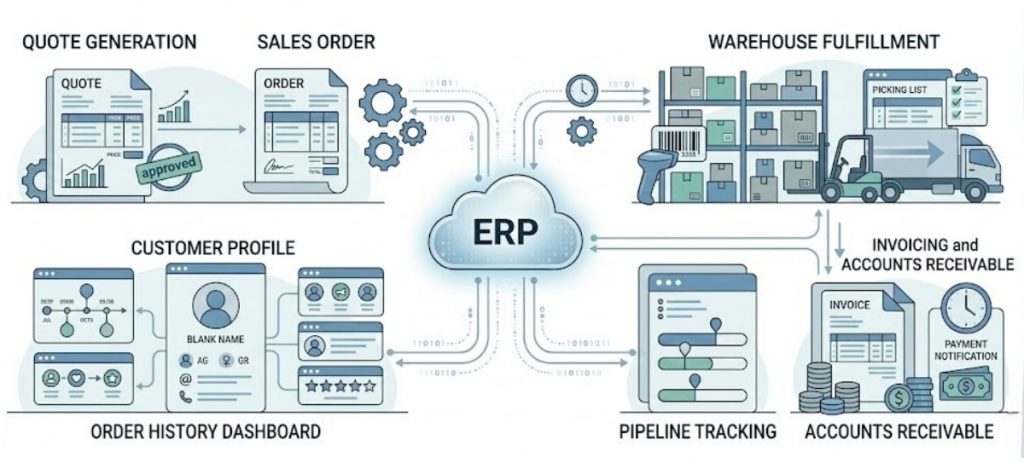
Business Central connects your sales pipeline to your fulfilment and finance workflows. A quote created in Business Central becomes a sales order, which updates inventory availability, triggers picking and packing in the warehouse and posts to the accounts receivable ledger all without manual re-entry at any step.
Your sales and customer service teams have immediate access to each customer’s order history, outstanding invoices, credit position and any service or support interactions. This context makes every customer conversation faster, more informed and more likely to result in a positive outcome.
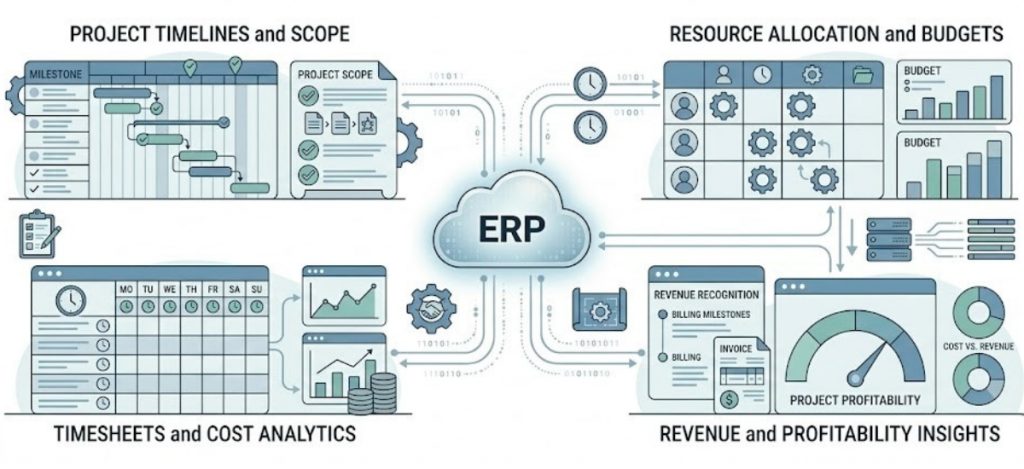
For service-based businesses — consultancies, engineering firms, IT companies, construction businesses — Business Central provides project management capabilities that connect time, cost and revenue in one view.
Each project has a defined budget, resource plan and billing schedule. Time entries from your team flow directly into project cost tracking. You can see at any point whether a project is tracking within budget, which resources are fully utilised and which engagements are most profitable — without building a separate tracking spreadsheet for each job.
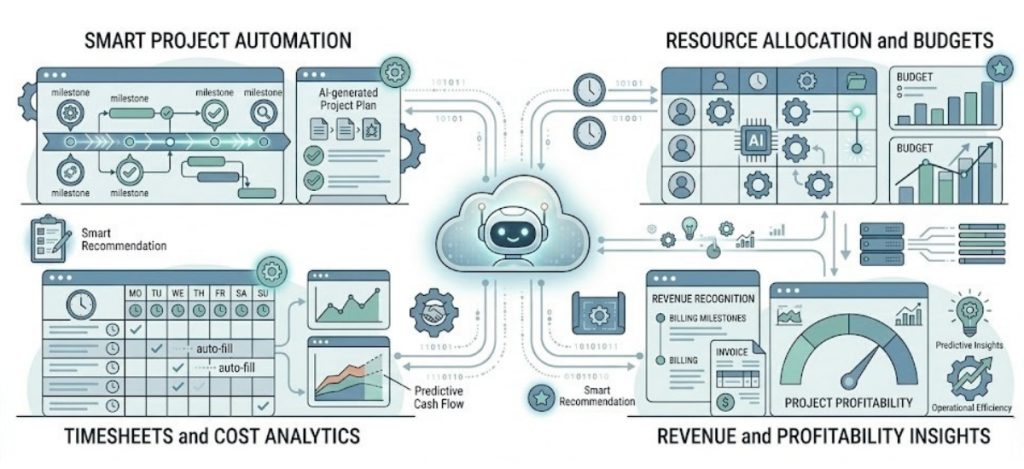
Business Central includes Microsoft’s Copilot AI features built directly into the platform. For Australian SMBs, this means intelligent automation is not a future aspiration it is available today, without additional setup or technical expertise.
Copilot in Business Central assists your team with tasks that previously required manual analysis: drafting marketing copy for product listings, summarising overdue accounts, predicting cash flow based on current pipeline and flagging unusual transactions that warrant attention. These are practical, time-saving applications available out of the box.
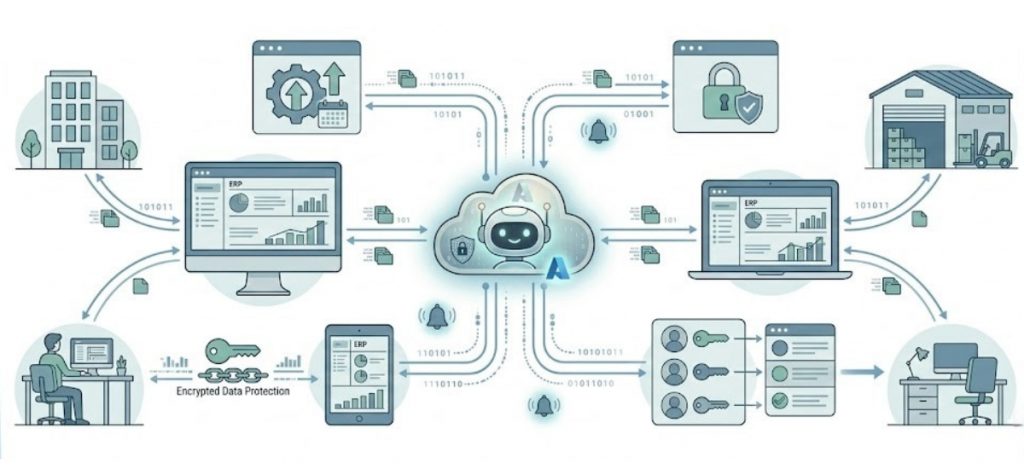
Business Central is hosted on Microsoft Azure which means there is no on-premise server to maintain, no manual software updates to manage and no dependency on being physically in the office to access your business data.
For Australian businesses operating across multiple sites, managing remote or hybrid teams or simply needing flexibility for ownership and management who travel, this architecture is a practical advantage, not just a marketing claim.
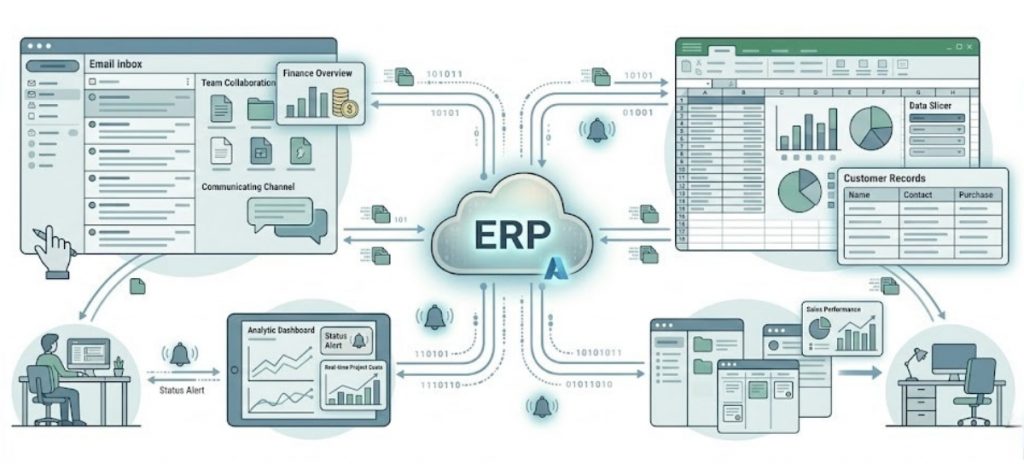
Most Australian businesses are already using Microsoft 365 Outlook for email, Teams for communication and Excel for analysis. Business Central integrates natively with all of these, which has two important practical implications.
First, your team does not have to learn an entirely new interface. Business Central works inside Outlook, meaning your accounts team can access customer records and raise invoices without leaving their email client. Data exports to Excel are live-connected, not static snapshots. And Teams conversations can include live Business Central data, so cross-department discussions are anchored in real numbers.
Second, adoption is faster. The biggest risk in any ERP implementation is the team not using the system as intended. When Business Central feels like a natural extension of tools your team already uses daily, that risk is significantly reduced.
If you are evaluating Business Central, you are likely also looking at one or more alternatives. The comparison below covers the platforms Australian SMBs most commonly shortlist. It is intended to help you understand where each platform fits — not to declare a universal winner, because the right choice depends on your specific business, industry and growth trajectory.
| Criteria | Business Central | MYOB Advanced | Xero (+ add-ons) | SAP Business One | Odoo |
|---|---|---|---|---|---|
| Best suited for | SMBs 10–200 staff, multi-module needs | SMBs with AU payroll focus | Small businesses, simple needs | Mid-market 50–500 staff | Tech-savvy SMBs, open source |
| Financial management | ✔ Full ERP-grade | ✔ Strong AU focus | ✔ Excellent accounting | ✔ Full ERP-grade | ✔ Good |
| Inventory management | ✔ Full multi-location | ✔ Good | ✘ Limited (add-ons needed) | ✔ Strong (esp. manufacturing) | ✔ Good |
| Project management | ✔ Built-in | ✔ Basic | ✘ Add-on required | ✔ Built-in | ✔ Good |
| AI and automation | ✔ Copilot built-in | ✘ Limited | ✘ Limited | ✔ Some features | ✔ Moderate |
| Microsoft 365 integration | ✔ Native, deep | ✘ Limited | ✘ Basic | ✘ Limited | ✘ Limited |
| Cloud architecture | ✔ Cloud-first Azure | ✔ Cloud-based | ✔ Cloud-native | ✔ Cloud available | ✔ Cloud available |
| Australian partner ecosystem | ✔ Strong AU network | ✔ Strong AU network | ✔ Very large AU network | ✔ Moderate AU network | ✘ Smaller AU network |
| Scalability ceiling | High — scales to 500+ | Medium | Low — outgrown at ~20 staff | High — scales well | Medium-high |
The most persuasive evidence for any platform is not its feature list — it is what happens inside real businesses after implementation. Below are three examples drawn from the types of businesses WMS works with regularly. Details have been anonymised, but the outcomes reflect genuine transformations we have seen firsthand.
A Melbourne-based wholesale distributor with 45 staff was running their operation across three separate systems: an accounting package, a standalone inventory tool and a CRM that their sales team rarely kept up to date. Month-end close took five working days and regularly surfaced errors that required manual correction.
After implementing Business Central, the same close process takes one day. Sales orders flow directly to warehouse picking lists without manual re-entry. Customer account managers can see live stock availability and credit positions during calls without needing to contact the warehouse or accounts team. The business added two new product categories in the first year post-go-live — something the previous system would have made operationally very difficult.
A Sydney engineering consultancy with 30 staff was managing project financials in spreadsheets. Profitability was visible only at project completion — by which point any cost overruns were too late to address. The finance director was spending three days each month assembling a management report from four separate data sources.
With Business Central, project managers now have a live view of hours consumed versus budget at any point during an engagement. Finance can see consolidated revenue, work in progress and staff utilisation across all active projects in a single dashboard. The firm reported a measurable improvement in project margin within the first six months — primarily because over-servicing was identified and addressed in real time rather than retrospectively.
A Queensland food manufacturer with 60 staff needed to meet retailer requirements for full supply chain traceability. Their existing system could not track ingredients from supplier lot to finished product, creating significant compliance exposure as major retail chains tightened their supplier standards.
Business Central’s lot tracking and serialisation capabilities gave the operations team end-to-end traceability across every production run. Combined with automated purchase order generation based on production schedules, their procurement team reduced emergency purchasing by a significant margin in the first year — improving both margin and supplier relationships.
Before engaging any vendor or partner, it is worth taking ten minutes to honestly assess where your business sits today. The checklist below reflects the most common indicators we see in businesses that are genuinely ready — and getting meaningful value — from a platform like Business Central.
Work through each item and note which ones describe your current situation:
| # | Check This Statement Against Your Business Today | Ticked? |
|---|---|---|
| 1 | We use more than two separate software systems to manage our business day-to-day | ☐ Yes |
| 2 | Our finance team manually re-enters data from at least one other system into our accounting software | ☐ Yes |
| 3 | Month-end close takes longer than two working days | ☐ Yes |
| 4 | We cannot see our current cash flow position in real time without manually pulling a report | ☐ Yes |
| 5 | Our inventory records are sometimes inaccurate or out of date when we need them most | ☐ Yes |
| 6 | We manage more than one location, warehouse or business entity | ☐ Yes |
| 7 | We have experienced staff creating their own spreadsheet-based workarounds for processes the system cannot handle | ☐ Yes |
| 8 | Customer service staff need to check multiple places to answer a basic order status question | ☐ Yes |
| 9 | We are planning to add new product lines, locations or team members in the next 12 months | ☐ Yes |
| 10 | Our current software vendor cannot give us a clear roadmap for how the system will grow with us | ☐ Yes |
Selecting the right ERP platform is important. But selecting the right implementation partner is arguably more important. The majority of ERP projects that struggle do so not because the software failed — they struggle because the implementation was poorly scoped, poorly managed or the partner lacked the industry knowledge to configure the system to the business’s real needs.
how to choose the right Business Central partner in Australia

One of the most common questions we hear from SMB leaders is: “How disruptive is this going to be?” It is a fair question. Any significant change to your business infrastructure carries risk but with the right approach, the disruption is manageable and the return comes quickly.
While every implementation is scoped to the specific business, the general journey for an Australian SMB looks like this:
| Phase | What Happens | What You Need From Your Team |
|---|---|---|
| 1. Discovery | Your partner learns your business — current systems, processes, pain points, priorities and growth plans. No assumptions, no generic templates. | Key stakeholders (finance, ops, sales) available for working sessions. Honest about current state. |
| 2. Solution Design | A tailored configuration plan is developed — which modules, which workflows, which integrations, which data to migrate. | Review and sign off on the proposed scope. Raise concerns early. |
| 3. Implementation | The system is configured, tested and refined. Your data is migrated and validated. Parallel runs may be conducted in some areas. | Designated internal project lead. Time commitment from key users for testing and feedback. |
| 4. Training and Adoption | Your team is trained — not just on how to use the system but on the new workflows it enables. Adoption is as important as configuration. | Commitment to the new way of working. Champion users in each department. |
| 5. Go-Live | The business switches to Business Central. Your partner provides close support during the stabilisation period. | Patience during the first 2–4 weeks. Issues will surface and be resolved — this is normal. |
| 6. Optimise | Once stable, the focus shifts to getting more value — adding modules, refining reports, expanding automation, training new staff. | Ongoing engagement with your partner. Regular reviews to assess what is working and what can be improved. |
The businesses that get the most from Business Central are the ones that approach implementation as an investment in their operating model — not just an IT project. With the right partner and the right internal commitment, the transition from fragmented tools to a connected platform is one of the most meaningful operational improvements a growing Australian business can make.
Running a growing Australian business is demanding enough without fighting your own systems every day. The businesses that scale successfully do so because they invest in infrastructure that works with them connecting their teams, automating the repetitive and giving leadership the visibility to make decisions with confidence.
Microsoft Dynamics 365 Business Central is not a magic solution. It is a platform that gives your team the tools to do what they do better — with less friction, fewer errors and better information. When it is implemented well, by a partner who understands your business and your industry, the impact is felt quickly and compounds over time.
If any of the challenges described in this guide sound familiar, the first step is a conversation not a commitment.
Microsoft Dynamics 365 Business Central is a cloud-based ERP platform designed for small and midsize businesses. It brings together finance, inventory, sales, purchasing, projects and operations into one connected system — replacing the patchwork of accounting software and standalone tools that most growing businesses rely on. It is built on Microsoft’s Azure infrastructure and integrates natively with Microsoft 365 tools including Outlook, Teams and Excel.
Yes. Business Central is purpose-built for SMBs businesses with roughly 10 to 200 staff that have outgrown basic accounting software but do not need the scale or complexity of enterprise ERP systems. Many Australian businesses in wholesale, manufacturing, retail, food production and professional services use Business Central as their core operating platform. It is available through local certified partners who understand the Australian market, ATO compliance requirements and local business practices.
MYOB and Xero are accounting platforms — they are designed to manage your financial records, including invoicing, payroll and tax reporting. Business Central is an ERP platform, which means it manages your entire business operation: finance, inventory, supply chain, sales pipeline, project management, purchasing and more. For a business that only needs to manage accounts, MYOB or Xero may be entirely adequate. For a business that needs inventory control, multi-department visibility, project costing or supply chain management — all connected to the same financial data — Business Central is the appropriate platform.
Yes — natively and deeply. Business Central integrates with Outlook (you can view customer records and create invoices without leaving your inbox), Excel (live data connections rather than static exports), Teams (share and discuss live Business Central data in team conversations) and Power BI (for advanced analytics and custom reporting). For businesses already invested in Microsoft 365, this integration is one of the most significant practical advantages of Business Central over competing ERP platforms.
Yes. Business Central supports extensions, custom workflows, third-party integrations and industry-specific configurations. Certified partners like WMS configure the platform to your business’s specific processes — not the other way around. Industry-specific extensions are available for sectors including retail, field service, manufacturing and more. Deeper customisations, such as custom integrations with existing e-commerce or warehouse management systems, are handled through the platform’s API layer.
Yes. Business Central is fully cloud-hosted on Microsoft Azure, which has local data centres in Australia. This means your business data can reside within Australian jurisdiction, supporting data sovereignty requirements. The platform is accessible from any internet-connected device — laptop, tablet or mobile — with no on-premise server infrastructure required. Microsoft manages all platform updates automatically, ensuring your system is always running the latest version.
Business Central is used across a wide range of industries in Australia. The most common sectors we see it deployed in include wholesale distribution, food and beverage manufacturing, professional services (engineering, consulting, IT services), retail and omnichannel commerce, construction and project-based businesses, and healthcare services. Its flexibility means it can be configured to the specific needs of most commercial industries, with the help of a knowledgeable implementation partner.
The most effective first step is a no-obligation discovery conversation with a certified Business Central partner. This is not a sales presentation — it is a structured session to understand your current systems, your business challenges and your growth plans. At WMS, our discovery process is designed to give you an honest assessment of whether Business Central is the right fit for your business, what an implementation would involve and what outcomes you can realistically expect. There is no cost and no commitment to this initial conversation.