
Your business is humming along nicely. Sales are picking up, teams are busy processing orders, managing inventory, and handling finances. But suddenly you notice your Microsoft Dynamics 365 Business Central system is slowing down. Queries take longer, reports hang, and backups are dragging. Your storage costs—especially if you’re on the cloud—are creeping higher and higher.
Table of Contents
ToggleSound familiar? It happens when your database grows too large with years of transactional data, ledger entries, and documents. The good news: Business Central’s compression features can help you regain control, speed up performance, and reduce costs—all while keeping your critical data safe and compliant.
This guide will walk you step-by-step through what Business Central compression really is, why it matters, how it works, and practical tips to implement it smartly in your business.
In plain English, compression in Microsoft Dynamics 365 Business Central is a way to reduce the size of your database by condensing older, “closed” financial and operational data into summarized records.
Think of it like packing a suitcase: instead of stuffing clothes randomly and creating bulky lumps, you neatly roll and compress everything to save space, leaving room for new items for the trip ahead.
With Business Central compression, data from closed fiscal years—like ledger entries, budgets, and warehouse activities—is summarized and condensed. This trimmed-down data remains fully available for reports and audits but uses much less storage space and improves overall system speed. everything you should know about Business Central

Compression is most effective when your Business Central system has large volumes of old transactional data that users no longer need every day. A good time to run compression is after closing a fiscal year, when sales, purchase, and ledger entries are final.
You can also use compression if pages are loading slowly or database storage costs are increasing. For growing businesses, running compression once or twice a year keeps the system fast and reduces unnecessary storage usage. It’s a practical way to maintain performance without affecting everyday work.

A bloated database can slow down report generation, posting transactions, and day-to-day navigation. Compression shrinks old data into lean summaries, so Business Central can respond faster to your team’s actions.

Especially on the cloud, where Azure storage fees compound with every fiscal year of accumulated data, compression delivers measurable cost reduction. For Australian businesses on Business Central’s SaaS plan, database size directly impacts licence tier costs — keeping your database lean protects your monthly operational budget as you scale. Microsoft Azure cloud storage pricing

Compression preserves key audit data and totals, maintaining full compliance for financial reports and tax filings, while making your database cleaner.

Smaller databases backup more quickly and require less IT overhead—good news for your IT department and business continuity.
Compression is typically applied for closed fiscal years, meaning accounting periods that have been settled and finalized—commonly 5 or more years old, though the exact policy can be adjusted with your partner or auditor’s guidance.
Australian Record-Keeping Requirements for Business Central Users:
Example: A Melbourne-based food distribution business running Business Central since 2019 found their system response times had tripled by mid-2024. After working with Work Made Simple WMS, they ran a full compression of 4 closed fiscal years across their item ledger, warehouse and purchase entries. Database size reduced by 38%, month-end report generation dropped from 14 minutes to under 4 minutes, and their cloud storage cost decreased in the following billing cycle — all with zero impact on their ATO audit capability.
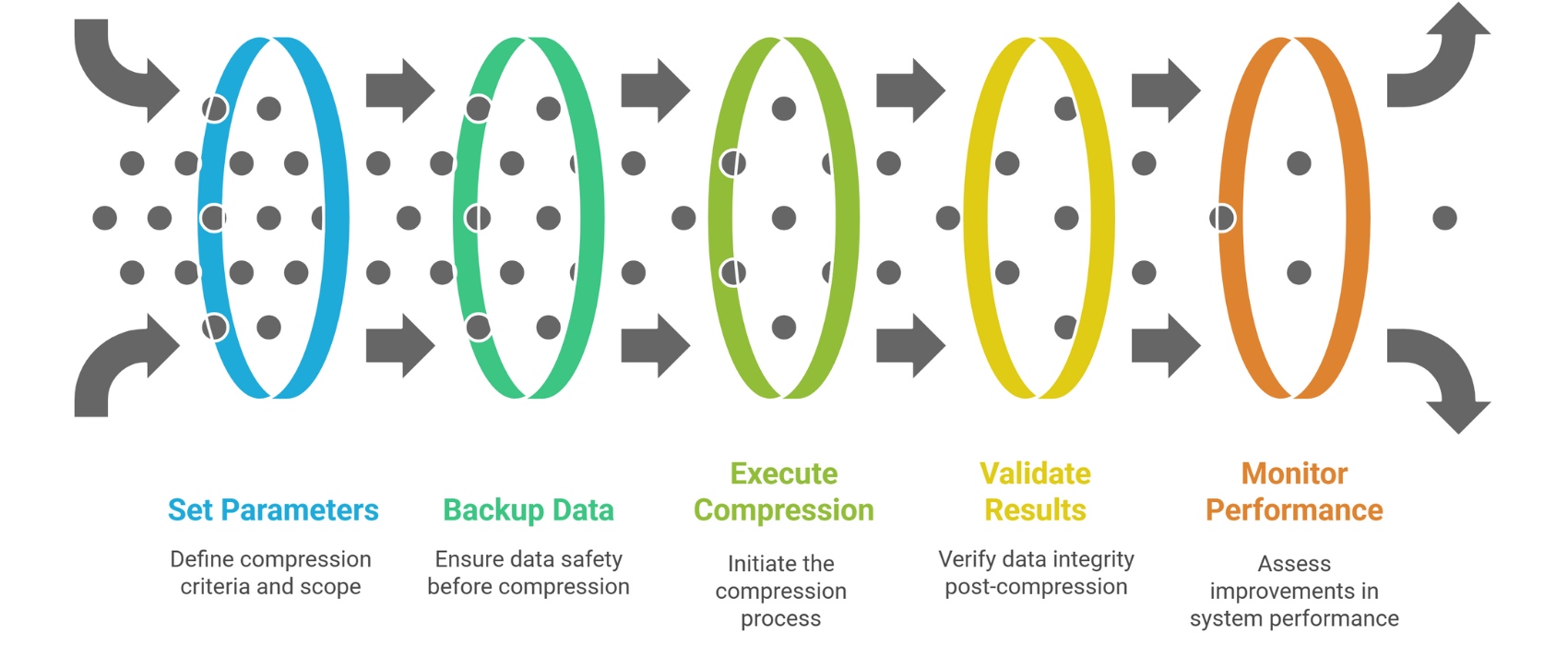
Review the size and content of your operational tables. Look for:
Decide:
Always take a full backup before compression to protect against any inadvertent issues.
Use Business Central’s Data Administration page to launch compression jobs or use automation tools/scripts if set up.
Ensure reports generate correctly and ledger balances match pre-compression results. Audit capabilities should remain fully operational.
Measure system responsiveness, report running times, and database size reductions as proof of impact.

| Pros | Cons |
|---|---|
| Significantly reduces active database size | Compression usually irreversible without restore backup |
| Improves system speed and response times | Initial compression can require downtime during operation |
| Cuts cloud storage and infrastructure costs | Limited to closed fiscal year data—current year remains intact |
| Maintains audit trail and compliance integrity | Requires planning and backup discipline |
| Simplifies ongoing data management and backups | May require partner expertise to configure and run safely |
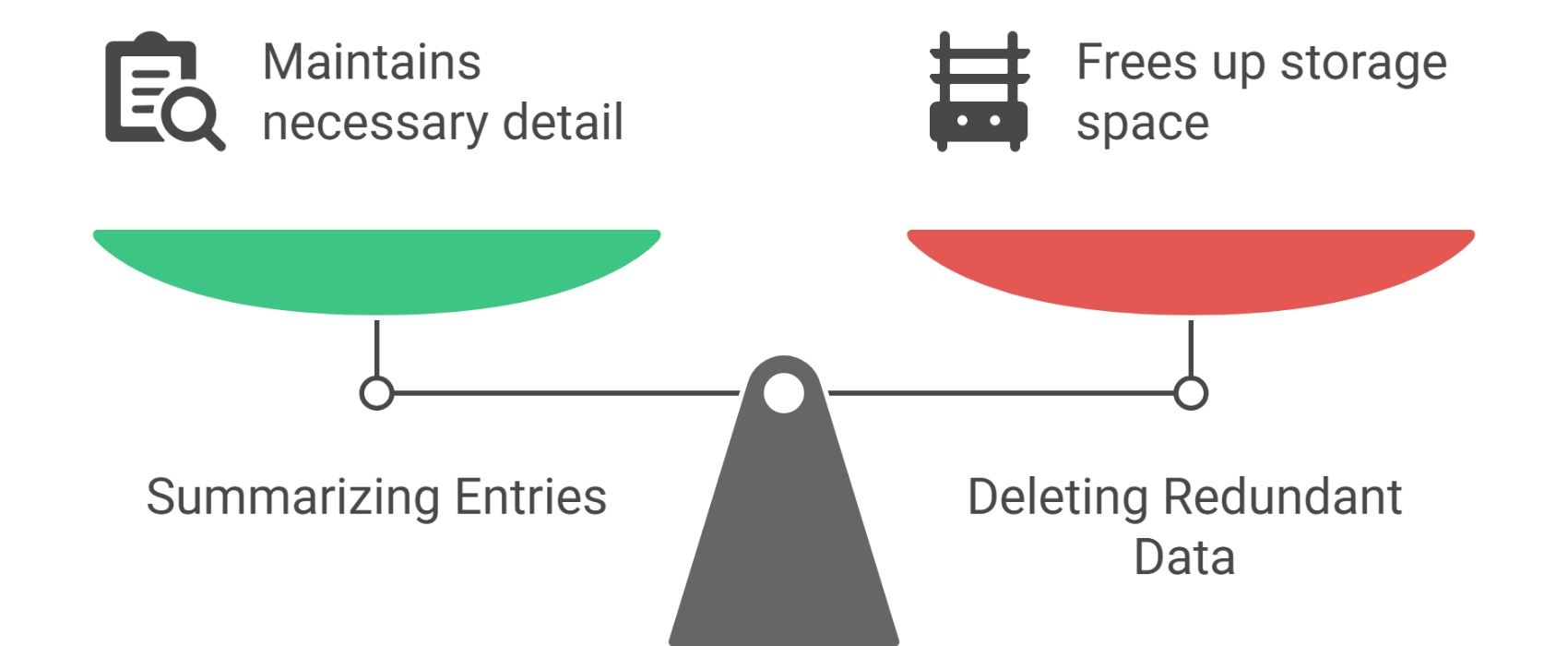
Condenses and removes redundant old data from live tables to optimize ongoing system use.
Moves old data completely out of the live system into a compressed, indexed archive, stored separately for compliance and auditing but less accessible day-to-day. Business Central archiving — moving data out of the live system
Both are important tools for managing your Business Central data growth, but compression focuses on improving current system performance.
After compression, detailed transaction lines are removed from live tables. While backups can allow restore, Business Central doesn’t provide a standard “uncompress” to revert entries. Plan carefully and store backups securely.
Yes. Microsoft designed compression to retain all essential data for audit trails, financial reconciliation, and tax reporting. Always verify with your auditor or compliance officer.
Many businesses run compression annually or in line with fiscal year closings to keep database size manageable and costs predictable.
While Business Central provides built-in tools, compression involves business rules and compliance considerations—working with a certified Microsoft partner ensures best practice and minimal disruption.
Picture your office filing cabinet:
Business Central compression is just like this: it tidies your data workspace for efficiency but keeps summaries accessible.
Microsoft Dynamics 365 Business Central compression is an essential tool for smoothing out the bumps of business growth. It helps you maintain a nimble, cost-effective ERP system without sacrificing data integrity or audit readiness.
By compressing older fiscal data, you speed up daily tasks, save on cloud costs, and keep your finance team and auditors happy—all while focusing on your business’s future growth instead of database struggles.
Your next step: Consult your Microsoft partner or internal IT team today about setting up a Business Central compression strategy tailored to your unique data volume and compliance requirements. Taking this step will pave the way for faster, leaner operations and better financial control tomorrow.
Work Made Simple (WMS) helps Australian businesses set up Business Central compression strategies that keep your ERP fast, your Azure costs lean and your compliance obligations met. We handle the planning, backup, execution and post-compression verification — so your team never experiences downtime
Smart data management means smarter business performance. Start compressing your Business Central data and see the difference firsthand!
Compression in Business Central refers to condensing older financial and operational data into summarized records to reduce database size, enhance system performance, and lower storage costs.
It speeds up report generation, transaction processing, and overall system responsiveness while saving cloud storage costs and simplifying backups and maintenance.
Common data includes general ledger entries, customer and vendor ledger entries, budgets, item ledger entries, warehouse entries, and resource ledger entries from closed fiscal years.
Compressed data retains summarized information for audit compliance but individual detailed transaction lines are removed from live tables; restoring detailed data generally requires a backup restore.
Many organizations compress data annually, often after closing their fiscal year, but the frequency depends on business growth and data volume.
Yes. Business Central’s compression preserves essential financial and audit information necessary to meet compliance requirements.
Compression condenses data within the live system to improve performance, whereas archiving moves data out of the live system to a separate store for long-term retention.
While Business Central offers built-in tools, working with a certified Microsoft partner or IT professional is recommended to ensure safe and compliant compression.
Yes. Compression is fully available in the cloud SaaS version of Business Central on Microsoft Azure. For Australian SMBs, it is particularly valuable as Azure storage costs are directly tied to database size — keeping it lean reduces your monthly operational costs without requiring an infrastructure upgrade.
Work Made Simple WMS is a certified Microsoft partner that helps Australian businesses plan and execute Business Central data compression and archiving strategies. We assess your current database, identify eligible data, run compression jobs with full backup protection and verify compliance integrity post-compression. contact