Are you an IT manager, financial controller, or business owner navigating the complexities of a growing Australian company? If your daily operations involve piecing together information from disconnected apps, patching together Excel spreadsheets, and struggling to gain a unified view of your financials, your current systems are likely hindering your growth.
Table of Contents
ToggleBefore committing to a new software ecosystem, it is critical to understand the tools available in the market. This guide provides a clear breakdown of Microsoft’s leading solution for growing enterprises, detailing how it works, who it is for, and how it resolves common operational bottlenecks.
This guide will take you through everything you need to know about Business Central in clear, plain English. Whether you’re considering it for the first time or looking to make the most of your existing setup, here’s your friendly roadmap.

Microsoft Dynamics 365 Business Central is a comprehensive, cloud-based Enterprise Resource Planning (ERP) solution designed specifically for small to medium-sized businesses. It connects sales, service, finance, and operations teams within a single application, allowing companies to automate manual processes, improve customer interactions, and make faster, data-driven decisions.
Business Central is engineered for small and mid-sized enterprises (SMEs)—typically organizations with 50 to 250 employees—that have outgrown basic accounting software like Xero or MYOB.
It is an ideal fit for industries dealing with complex operational requirements, such as manufacturing, wholesale distribution, and retail. These businesses often require advanced inventory tracking, multi-warehouse management, and precise job costing—capabilities that are either unavailable or require expensive add-ons in entry-level financial software.

Australian SMBs — particularly in retail, manufacturing and distribution — are adopting Business Central at an accelerating pace. The platform supports Australian GST and BAS compliance natively, integrates with Australian payroll providers, and is backed by a growing network of local Microsoft partners.
For businesses currently on MYOB, Xero or legacy ERP systems, Business Central offers a structured migration path that preserves historical data while dramatically upgrading operational capability. Australian grocery chains like Cornetts Supermarkets and retail businesses across the country have implemented LS Retail — built on Business Central — to unify their POS, inventory and back-office operations in a single platform.
Unlike disjointed software stacks, an ERP unifies various business departments. Here is a breakdown of how the primary modules function within the system.
| Business Function | How Business Central Solves It | Benefit to the User |
|---|---|---|
| Financial Management | Automates reconciliations, manages fixed assets, and consolidates general ledgers. | Closes the books faster with highly accurate, real-time data. |
| Supply Chain & Inventory | Predicts stock replenishment and tracks items via serial/lot numbers. | Prevents stockouts, reduces holding costs, and improves order fulfillment. |
| Sales & Service Management | Tracks customer interactions and manages service contracts directly from Outlook. | Improves customer retention, enables cross-selling, and accelerates the quote-to-cash process. |
| Project Management | Monitors job costing, tracks employee timesheets, and analyzes project profitability. | Ensures complex projects remain on schedule and within budget. |
| Manufacturing Operations | Manages bill of materials (BOM), production routing, and capacity planning. | Streamlines the production floor and reduces material waste. |

A major challenge for growing Australian businesses is the inability to see the “big picture.” When data is trapped in silos, generating a simple profitability report can take days.
Business Central solves this by centralizing all data. Because it integrates natively with Microsoft Power BI, financial controllers can create customized, real-time dashboards. This means leadership can instantly view cash flow forecasts, monitor outstanding payables, and track inventory valuations without manual data extraction. With built-in compliance features tailored for the Australian market, managing local tax obligations and regulatory requirements becomes a seamless, automated process.
Imagine your business as a busy airport:
Business Central acts like the airport’s single control tower—a smart, cloud-connected system coordinating everyone in real time, reducing delays and errors.
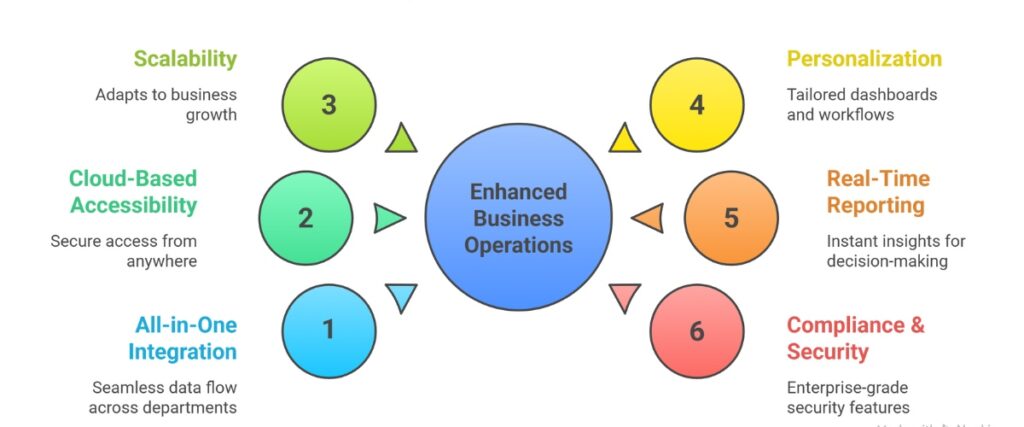
Data flows effortlessly between finance, sales, inventory, and projects. No disconnected spreadsheets or duplicate entries. This creates huge efficiency gains and fewer mistakes. Business Central customization and integration options
Access your business data securely from anywhere—office, home, or on the road—with updates delivered automatically. No heavy IT infrastructure needed.
Whether you have one location or dozens, Business Central adapts. Adding users, stores, or new modules is simple and often just a few clicks.
Tailor your dashboards, reports, and workflows to what matters most for your operations and roles. Custom extensions and Microsoft Power Platform integration extend capabilities. How to customise Business Central for your workflows
Instant visibility into sales trends, cash flow, project progress, inventory levels, and staff performance enables smarter, quicker decisions.
Built on Microsoft Azure, it offers enterprise-grade security, data privacy compliance, and audit-ready features designed for local regulations around the world.
Implementing a new ERP is not a standard software download; it requires mapping the technology to your unique business processes. Choosing a certified, local implementation partner ensures that the system is configured correctly from day one.
A specialized partner brings deep market insights, implementation experience, and local market understanding. They will handle the complex data migration from your legacy systems, provide tailored training for your staff, and offer ongoing support to ensure the system scales alongside your business.

Continia for finance workflow automation


how LS Retail streamlines POS and inventory

| Pros | Potential Challenges |
|---|---|
| Intuitive user interface with strong Microsoft 365 integration. | Initial setup and customization require planning and expertise. |
| Flexible pricing and modular licensing. | Change management necessary for staff adoption. |
| Strong ecosystem of Microsoft partners and third-party extensions. | Some advanced features may need partner help or development. |
| Rapid deployability, cloud-first with offline capability. | Performance for very large enterprises may require specific architecture considerations. |
| Frequent feature updates and enhancements. |
Microsoft Dynamics 365 Business Central isn’t just another software—it’s a platform for growth, efficiency, and innovation. By unifying your back office and operations with real-time insight and automation, you free your team to focus on what really matters: serving customers, innovating products, and expanding your business.
Next step: Make a checklist of your biggest business challenges and reach out to a Microsoft partner to explore how Business Central can solve them. Whether you’re aiming to streamline finances, boost inventory accuracy, or unlock new sales channels, the right ERP system can be your competitive edge.
Ready to explore how Business Central fits your Australian business? Our team at Work Made Simple (WMS) specialises in Business Central implementation, customisation and LS Retail integration for Australian SMBs in retail, manufacturing and distribution.”
Technology should simplify, not complicate. Business Central brings clarity to complexity and helps your business thrive in today’s fast-paced world. Ready to explore how Business Central fits your business? Let’s start the conversation today!
It is a comprehensive, cloud-based ERP system that connects your financials, sales, service, and operations into a single, unified application designed for small and mid-sized businesses.
Yes. Business Central is the modernized, cloud-first evolution of Microsoft Dynamics NAV (formerly Navision). It contains the same robust functionality but is built for the modern cloud environment.
While versatile, it is particularly powerful for manufacturing, wholesale distribution, retail, and professional services, due to its deep inventory, supply chain, and project management capabilities.
Absolutely. It is fully localized for the Australian market, handling specific regional requirements like GST calculation, BAS reporting, and local banking integrations.
Yes. It is a true Software-as-a-Service (SaaS) product hosted on Microsoft Azure, meaning you can access it securely from any web browser or mobile device without managing internal servers.
It features native integration. You can share Business Central records directly within Teams chats, edit bulk financial data live within Excel, and generate customer quotes directly from Outlook.
Yes. The system is highly adaptable. Through Microsoft’s AppSource, businesses can add industry-specific extensions (like advanced warehouse management or retail point-of-sale tools) without altering the core code.
Ongoing support is typically provided by your certified implementation partner. This includes system updates, user training, technical troubleshooting, and strategic advice on how to leverage new features as your business evolves.
Transitioning to a unified platform can transform how your team operates. Explore your software options and [book a discovery call] with the Australian ERP experts at Work Made Simple (WMS) to discuss how technology can enable your business goals.