Choosing an ERP system for your Australian retail business can feel overwhelming. With dozens of vendors promising transformation, how do you cut through the noise and find the solution that actually fits your needs? More importantly, how do you avoid expensive mistakes that could set your business back years?
Table of Contents
ToggleThis buyer’s guide provides a practical decision framework specifically designed for Australian retail SMBs. We’ll focus on what actually matters: Australian compliance, local support, transparent pricing and proven results. By the end, you’ll have a clear roadmap for evaluating vendors and making a confident decision.
For a comprehensive understanding of how ERP drives omnichannel retail success in Australia, refer to our complete guide.

Devinder Sareen is a Microsoft Dynamics 365 Business Central and LS Retail partner with 20+ years of ERP implementation experience across Australian retail, distribution and manufacturing.
WMS IT has helped Australian retailers select and implement the right ERP.
Your ERP system will become the operational backbone of your retail business. It will touch every department: sales, inventory, finance, customer service and operations. A wrong choice doesn’t just waste money on implementation—it creates ongoing friction that compounds over years.
The good news? Following a structured evaluation process dramatically improves your odds of success. Let’s break down exactly how to choose wisely.
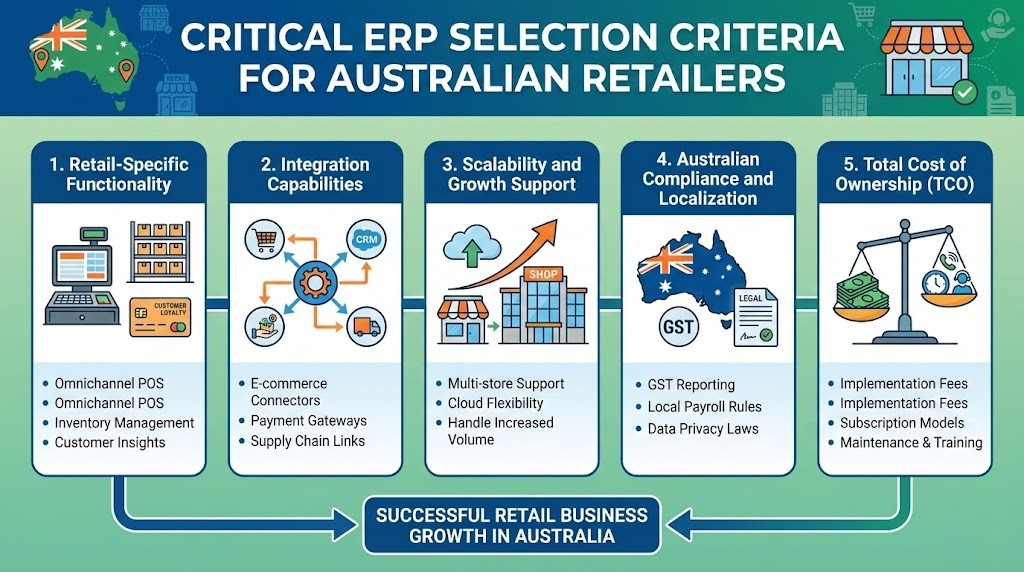
Generic ERP systems weren’t built for retail. They lack critical capabilities that retailers need daily. Don’t settle for workarounds or expensive customizations. Your ERP should handle retail operations natively.
Example: Dynamics 365 Business Central with LS Retail provides comprehensive retail functionality out-of-the-box, while generic ERPs like SAP Business One require significant customization for basic retail operations.
Your ERP doesn’t operate in isolation. It needs to connect seamlessly with your ecommerce platform, payment processors, shipping carriers, marketplaces and more. Poor integration capabilities lead to manual data entry, errors and operational bottlenecks.
Red flag: If a vendor says ‘we can integrate with anything,’ ask for specific examples and implementation timelines. Vague promises often mean expensive custom development.
Your ERP should grow with your business, not constrain it. Consider where you’ll be in 3-5 years: more locations, higher transaction volumes, additional product lines and expanded channels.
Pro tip: Ask vendors for reference customers at your current size AND at your target size in 3 years. Speak with both to understand the growth experience.
International ERP systems often overlook Australian-specific requirements. Don’t assume compliance—verify it explicitly. Non-compliance can lead to ATO penalties, failed audits and operational headaches.
Important: Systems designed for the US or European markets may claim ‘global capabilities’ but lack Australian tax and compliance features. Always request a demo showing Australian-specific functionality.
The sticker price is just the beginning. To make an informed decision, you need to understand all costs over a 3-5 year period. Hidden costs often exceed the initial license fees.
Budget reality check: For a typical Australian retail SMB with 5-15 users, expect first-year costs of $30k-$80k (cloud) or $50k-$120k (on-premise), then $10k-$25k annually for subscriptions and support.

One of your first decisions is deployment model. While we cover this extensively in our dedicated cloud vs on-premise comparison guide, here are the key considerations for most Australian retail SMBs.
| Factor | Cloud ERP | On-Premise ERP |
|---|---|---|
| Upfront Cost | Low ($15k–$40k) | High ($50k–$120k) |
| Implementation | Faster (2–4 months) | Slower (4–6 months) |
| Updates | Automatic | Manual / costly |
| Accessibility | Anywhere, mobile | Office / VPN only |
| IT Resources | Minimal required | Dedicated IT needed |
| Best For | 90% of retail SMBs | Highly specialized needs |
Recommendation: Unless you have specific regulatory requirements preventing cloud deployment or extremely unique customization needs, cloud ERP offers better value and flexibility for most Australian retailers.
The cloud vs on-premise decision is covered in depth in our dedicated comparison guide. Here’s the summary specifically for Australian retail SMBs:
Some Australian retailers choose a hybrid model — core ERP in the cloud with specific workloads (e.g. POS terminals) cached locally for connectivity resilience. Business Central supports this configuration natively.
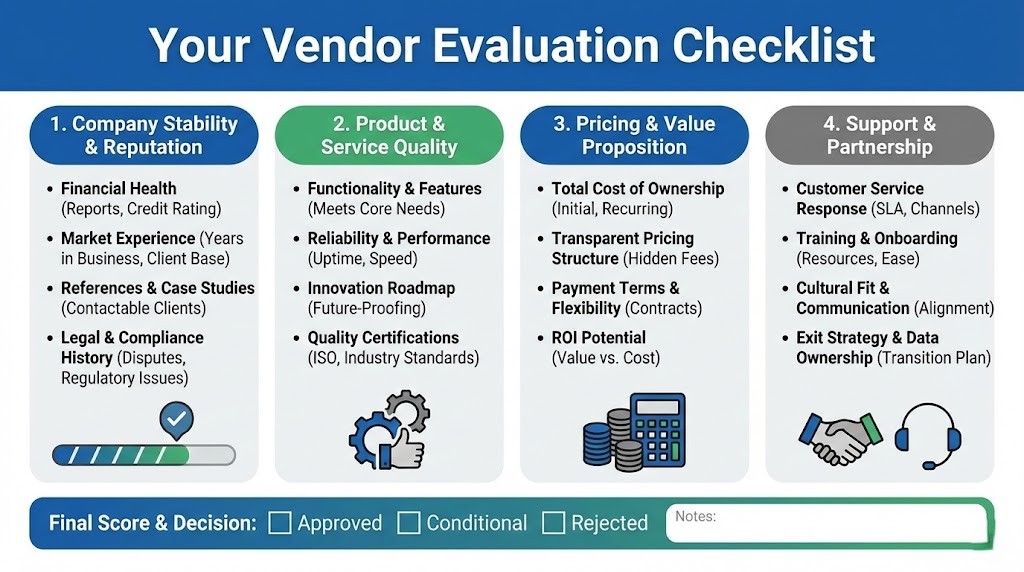
Use this checklist when meeting with vendors. A ‘no’ answer doesn’t automatically disqualify a vendor, but it should trigger deeper investigation.
We evaluated the leading ERP options available to Australian retail SMBs on 5 criteria that matter most for retail operations:
| Criteria | BC + LS Retail | NetSuite | MYOB Acumatica | SAP B1 | Odoo |
|---|---|---|---|---|---|
| Retail POS (native) | ⭐⭐⭐⭐⭐ | ⭐⭐⭐ | ⭐⭐⭐ | ⭐⭐⭐ | ⭐⭐⭐ |
| AU Compliance (GST/BAS) | ⭐⭐⭐⭐⭐ | ⭐⭐⭐⭐ | ⭐⭐⭐⭐⭐ | ⭐⭐⭐⭐ | ⭐⭐⭐ |
| Omnichannel Inventory | ⭐⭐⭐⭐⭐ | ⭐⭐⭐⭐ | ⭐⭐⭐⭐ | ⭐⭐⭐ | ⭐⭐⭐ |
| SMB Pricing (AU) | ⭐⭐⭐⭐ | ⭐⭐⭐ | ⭐⭐⭐⭐ | ⭐⭐⭐ | ⭐⭐⭐⭐⭐ |
| AU Local Support | ⭐⭐⭐⭐⭐ | ⭐⭐⭐ | ⭐⭐⭐⭐ | ⭐⭐⭐ | ⭐⭐ |
| Scalability (to 50+ loc) | ⭐⭐⭐⭐⭐ | ⭐⭐⭐⭐⭐ | ⭐⭐⭐⭐ | ⭐⭐⭐⭐ | ⭐⭐⭐ |
| Implementation Speed | ⭐⭐⭐⭐ | ⭐⭐⭐ | ⭐⭐⭐⭐ | ⭐⭐⭐ | ⭐⭐⭐⭐⭐ |
| APPROX AU$/USER/MONTH | $108–$160 | $200–$350 | $150–$250 | $180–$300 | $50–$120 |
WMS IT’s recommendation for Australian retail SMBs:
Microsoft Dynamics 365 Business Central combined with LS Retail POS provides the most complete out-of-the-box retail management platform for Australian SMBs. It is the only combination that delivers native POS, omnichannel inventory, Australian compliance, and scalability from 1 to 100+ stores on a single platform.
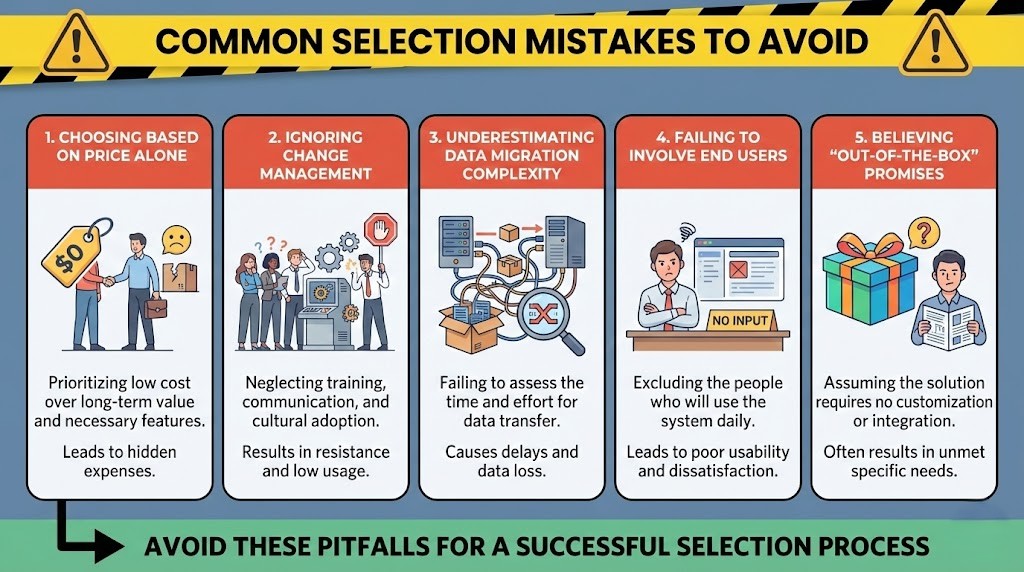
Learning from others’ mistakes is cheaper than making your own. Here are the most common ERP selection errors we see Australian retailers make:
The cheapest option often becomes the most expensive. Low initial costs usually mean inadequate functionality, requiring expensive customization later. Focus on value and fit, not just price.
Technical capability doesn’t guarantee success. User adoption makes or breaks implementations. Budget time and resources for training, process redesign and employee buy-in.
Migrating years of messy data from spreadsheets and legacy systems is harder than it looks. Data cleansing often takes 30-40% of total implementation time. Start early and involve subject matter experts.
Decisions made by management without input from store staff, warehouse teams and customer service often miss critical requirements. Include representatives from each department in the selection process.
Every business has unique processes. While retail-specific ERPs minimize customization, some configuration and setup is always required. Be skeptical of vendors promising zero customization.
Based on 20+ years of ERP implementation experience, these are the questions that reveal how honest and capable a vendor truly is:
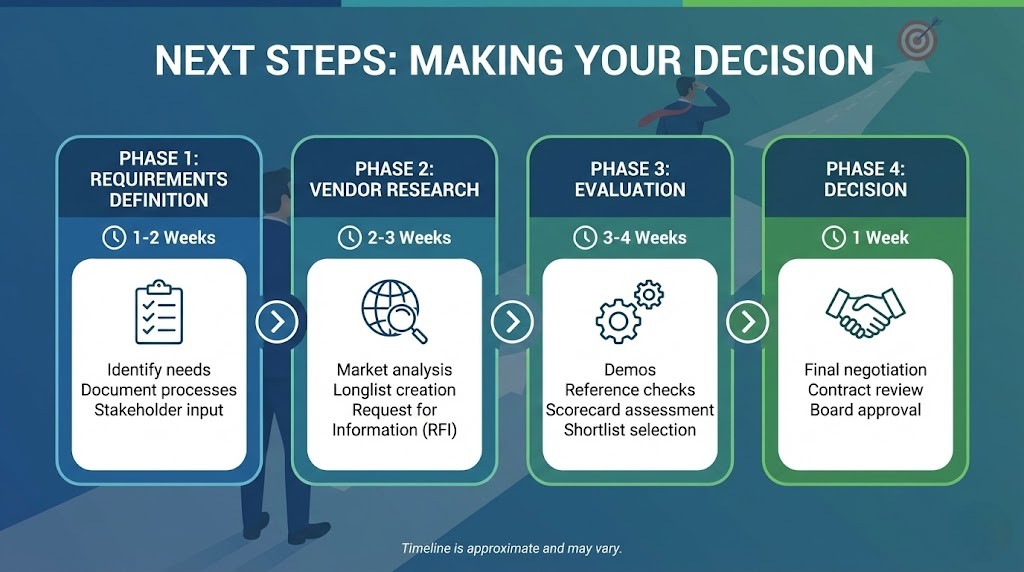
Now that you understand the selection criteria and common pitfalls, here’s how to move forward systematically:
After selecting your ERP, your next focus should be implementation planning. Our 90-day implementation roadmap provides detailed guidance on executing a successful rollout.
WMS IT is a certified Microsoft Dynamics 365 Business Central and LS Retail partner based in Australia. We offer a structured ERP selection process for retail SMBs:
Book your free ERP selection workshop with WMS IT
Or explore our full ERP services:
Business Central Services
LS Retail Partner
Custom ERP Solutions
Industry-Specific ERP
Choosing the right ERP is one of the most important technology decisions your retail business will make. By focusing on the five critical criteria—retail-specific functionality, integration capabilities, scalability, Australian compliance and total cost of ownership—you’ll dramatically improve your odds of success.
Remember that vendor selection is just the beginning. Implementation quality, change management and ongoing optimization determine whether your ERP investment delivers the promised ROI. Choose a system that fits your current needs while supporting your growth ambitions, and partner with experienced implementers who understand Australian retail.
For Australian retail businesses considering Dynamics 365 Business Central or LS Retail, Work Made Simple (WMS) offers expert implementation and support services. Our team specializes in helping retailers achieve measurable results through properly configured, well-implemented ERP systems.
Devinder Sareen is a Microsoft Dynamics 365 Business Central and LS Retail partner with 20+ years of ERP implementation experience across Australian retail, distribution and manufacturing.
Essential features include multi-channel inventory management, native POS integration, unified customer data, omnichannel fulfillment capabilities, automated returns processing, merchandising tools and retail-specific analytics. Ensure these capabilities are built-in, not bolt-on customizations.
Create a weighted scoring matrix covering functionality (40%), total cost (25%), implementation quality (20%), vendor support (10%) and scalability (5%). Score each vendor 1-5 on each criterion, multiply by weights and total the scores. Always include reference checks and hands-on trials in your evaluation.
Most Australian retailers see positive ROI within 12-18 months. Quick wins include reduced stockouts (immediate), improved inventory accuracy (3-6 months) and labor savings from automation (6-12 months). Full value realization including strategic benefits typically takes 18-24 months as you optimize processes and expand capabilities.