
Ever felt buried under spreadsheets, emails, and endless “to-dos” that never seem to end?
Table of Contents
ToggleYou’re not alone. Many businesses waste valuable hours wrestling with disjointed tools and manual processes. Imagine freeing your team from that chaos—with one powerful, cloud-based system that brings everything together. That’s where Dynamics 365 Business Central comes in.
Why does this matter? Because time is your most precious resource. The faster you automate routine tasks, the sooner you can focus on strategic growth, delighting customers, and launching your next big idea.
Below, discover the top 10 features of Business Central 365 that will transform your operations overnight—plus a clear guide, a mini case story, myth-busting table, and practical tips you can apply today.

Manage your general ledger, accounts payable, accounts receivable, and cash flow in one place.

Track inventory levels, purchase orders, and vendor performance automatically.

Give each team member a tailored view of their tasks and KPIs.

Leverage Power BI integration for interactive charts and dashboards.

Plan jobs, allocate resources, and monitor budgets from start to finish.

Turn leads into orders without toggling between systems.

Optimize picking, packing, and shipping processes.

Set up multi-level approvals and automatic notifications.

Stay on top of tax rules, currency exchange, and reporting requirements.

Choose from hundreds of add-ons or build your own apps.

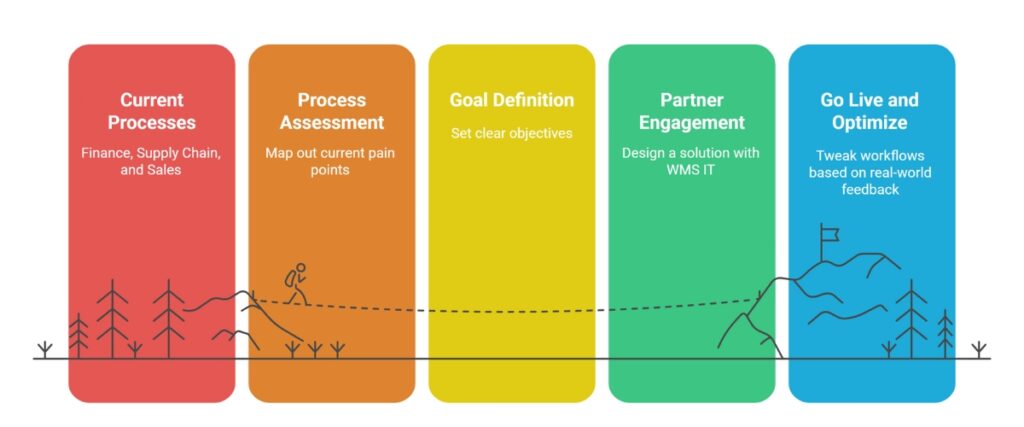
Map out current pain points in finance, supply chain, and sales.
Set clear objectives: reduce month-end close by X days, cut stockouts by Y%.
Move your data into Business Central with minimal downtime.
Hands-on workshops ensure everyone knows how to use their dashboards and reports.
Launch quickly, then tweak workflows based on real-world feedback.
| Myth | Reality |
|---|---|
| Only for big businesses | Perfect for SMEs – Scales with you |
| Too complex | Quick setup – Live in weeks |
| Too expensive | Saves money – Replaces multiple systems |
| Hard to learn | Intuitive design – Staff learn in hours |
A Melbourne-based wholesale distributor was managing 1,400+ SKUs across two warehouses using MYOB and Excel — with daily stock discrepancies, manual purchase order processing and a month-end close that took 8 days.
After implementing Business Central with Work Made Simple WMS:
“The biggest surprise was how quickly the team adopted it — by the end of week two, nobody wanted to go back.”
— Operations Manager, Melbourne Wholesale Distributor
We’ve helped many businesses like yours—from family-owned distributors to national services firms—transform their operations with Business Central. Our philosophy is simple: technology should free you from hassles, not add to them. Whether it’s a full ERP rollout or a small custom add-on, we focus on streamlining your processes so you can grow, innovate, and delight customers every day.
Ready to simplify your operations and unlock real growth? DM us, book a free call, or visit our website to see how Business Central 365 can work for you: WMS: Work Made Simple . Let’s make work simple—together.
Start with a simple conversation. Let's discuss your specific challenges and how Business Central 365 Features to Streamline Operations Fast. No pressure, no hard sell – just an honest assessment of how we can help your business thrive.
Stay productive, stay focused, and watch your business soar!
Financial management, real-time inventory, role-based dashboards, Power BI reporting, workflow automation and Microsoft 365 integration — covering every operational function in a single platform
BC includes multi-entity, multi-currency, project costing, manufacturing and full supply chain — capabilities that MYOB and Xero do not offer at scale
Yes — Copilot is embedded inside Business Central. It answers plain-English data questions, predicts cash flow, automates AP and generates purchase suggestions without a data analyst
Yes — Business Central supports unlimited warehouse locations with directed put-away, bin management, wave picking and mobile scanning via the Tasklet Factory extension
GST tax codes are applied automatically per transaction type. BAS summaries are generated directly in Business Central for quarterly ATO lodgement
Microsoft AppSource is a certified marketplace of 350+ extensions for Business Central — including LS Retail for retail, Continia for AP automation and Tasklet Factory for warehousing
Native integration with Outlook, Excel, Teams, Word and Power BI — create quotes from email, refresh reports live in Excel and approve transactions inside Teams
Yes — hosted on Microsoft Azure with 99.9% uptime, Australian data centre residency, multi-factor authentication, role-based access and full audit trail on every transaction
Yes — via AL development language and certified AppSource extensions. Business Central can be tailored for retail, manufacturing, distribution, food service and professional services
Work Made Simple (WMS) is a certified Microsoft Dynamics 365 Business Central partner in Australia. Contact us for a free discovery consultation tailored to your business