Top 10 Business Central 365 Features to Streamline Operations Fast

Top 10 Business Central 365 Features

Ever felt buried under spreadsheets, emails, and endless “to-dos” that never seem to end?

You’re not alone. Many businesses waste valuable hours wrestling with disjointed tools and manual processes. Imagine freeing your team from that chaos—with one powerful, cloud-based system that brings everything together. That’s where Dynamics 365 Business Central comes in.

Why does this matter? Because time is your most precious resource. The faster you automate routine tasks, the sooner you can focus on strategic growth, delighting customers, and launching your next big idea.

Below, discover the top 10 features of Business Central 365 that will transform your operations overnight—plus a clear guide, a mini case story, myth-busting table, and practical tips you can apply today.

1. Unified Financial Management

Manage your general ledger, accounts payable, accounts receivable, and cash flow in one place.

  • Multi-dimensional general ledger — track revenue and costs by department, project, location and product line simultaneously
  • Accounts payable automation — three-way PO matching, supplier invoice approval workflows and scheduled payment runs
  • Accounts receivable — automated statements, overdue reminders and direct debit setup per customer
  • Bank reconciliation — live bank feeds with automatic transaction matching — close the books in hours not days
  • Cash flow forecasting — AI-driven 30/60/90-day cash projections based on open invoices and committed orders
  • Australian GST and BAS compliance — tax codes applied automatically, BAS summaries generated in one click
  • Fixed asset management — depreciation schedules, disposal tracking and revaluation per ATO requirements

2. Seamless Supply Chain Automation

Seamless Supply Chain Automation

Track inventory levels, purchase orders, and vendor performance automatically.

  • Real-time stock levels across every warehouse, location and bin — one live view across the entire supply chain
  • Automated replenishment — minimum stock levels trigger purchase order suggestions without planner involvement
  • Vendor performance tracking — on-time delivery rates, quality returns and price variance per supplier
  • Multi-location stock transfers — move inventory between sites with full approval and audit trail
  • Barcode and RFID scanning — accurate receiving, picking, packing and stocktake
  • Lot and serial number tracking — full product traceability from supplier receipt to customer delivery

3. Customized Role-Based Dashboards

Customized Role-Based Dashboard

Give each team member a tailored view of their tasks and KPIs.

  • Finance Manager view — cash position, overdue receivables, upcoming payments and budget variance
  • Sales Manager view — pipeline value, conversion rate, top accounts and overdue quotations
  • Operations Manager view — open orders, stock shortages, production bottlenecks and warehouse KPIs
  • CEO/Owner view — consolidated P&L, gross margin by segment and rolling cash flow forecast
  • Personalised role centres — users only see the data, actions and reports relevant to their job

4. Built-in Reporting and Analytics

Built-in Reporting and Analytics

Leverage Power BI integration for interactive charts and dashboards.

  • Native Power BI integration — publish live Business Central data to interactive executive dashboards
  • Built-in financial reports — P&L, balance sheet, aged debtors/creditors, cash flow — no setup required
  • Microsoft Copilot natural language reporting — ask “What were my top 10 customers last quarter?” in plain English
  • Dimension-based analysis — slice any report by department, project, location or cost centre
  • Excel with live refresh — export any dataset to Excel; refresh data without re-exporting
  • Scheduled report delivery — financial reports emailed automatically at period end to nominated stakeholders

5. Project Management Made Easy

Project Management Made Easy

Plan jobs, allocate resources, and monitor budgets from start to finish.

  • Job costing — track material, labour, subcontract and overhead costs per project in real time
  • Budget vs actual variance — compare planned vs actual at any project stage with drill-through detail
  • Resource scheduling — allocate staff and equipment with capacity availability checking
  • Time and expense entry — billable hours and expenses logged directly against client jobs
  • Project invoicing — invoice by percentage completion, milestone or actual time and materials
  • WIP accounting — work-in-progress values calculated automatically for accurate month-end reporting

6. Sales and Marketing Integration

Sales and Marketing

Turn leads into orders without toggling between systems.

  • Full sales cycle management — quotes, orders, shipments and invoices in a single workflow
  • Outlook integration — create quotes and view customer history from inside your email inbox
  • Customer credit limit management — automatic alerts when orders would breach approved credit terms
  • Backorder management — partial shipments handled automatically with customer notification
  • Price lists and discount structures — customer-specific pricing, volume discounts and promotional pricing
  • Opportunity tracking — basic CRM pipeline without the cost and complexity of a separate CRM tool

7. Advanced Warehouse Management

Advanced Warehouse Management

Optimize picking, packing, and shipping processes.

  • Directed put-away and picking — system-optimised routes through the warehouse reduce travel time and errors
  • Bin management — assign stock to specific bins; system directs staff to the correct location
  • Wave picking — batch multiple orders into a single warehouse pick run for efficiency
  • Shipping carrier integration — print labels, book collections and track shipments from within Business Central
  • Tasklet Factory extension — mobile scanning with offline resilience for Australian warehouses
  • Cross-docking — receive supplier goods and immediately route to outbound orders without putaway

8. Workflow Approvals and Alerts

8. Workflow Approvals

Set up multi-level approvals and automatic notifications.

  • Approval workflows — purchase orders, credit notes, sales discounts and journal entries routed automatically
  • Power Automate integration — connect Business Central events to Teams notifications, email alerts or third-party systems
  • Recurring journal automation — monthly depreciation, accruals and allocations posted without manual intervention
  • Document management — purchase invoices, contracts and delivery dockets attached to transactions automatically
  • Remittance automation — batch supplier payments with automatic remittance emails sent on payment run
  • Audit trail — every workflow action logged with user, timestamp and before/after values

9. Global and Local Compliance

Global and Local Compliance

Stay on top of tax rules, currency exchange, and reporting requirements.

  • Australian GST compliance — multiple GST tax codes (10%, 0%, input-taxed) applied automatically per transaction type
  • BAS reporting — quarterly BAS summary generated directly from Business Central with ATO-ready formatting
  • Single Touch Payroll (STP) — staff time and payroll integration for ATO compliance
  • Multi-currency — transactions recorded in foreign currency with automatic exchange rate revaluation
  • Intercompany accounting — transactions between related Australian entities reconciled automatically
  • Audit and compliance trail — all posted transactions immutable with full change log for ATO audit purposes

10. Extensible App Ecosystem

Extensible App Ecosystem

Choose from hundreds of add-ons or build your own apps.

  • Microsoft AppSource marketplace — 350+ certified extensions covering retail, manufacturing, finance and logistics
  • LS Retail — unified POS, inventory and loyalty for Australian retailers built natively on Business Central
  • Continia — accounts payable automation with OCR document capture and approval workflows
  • Tasklet Factory — mobile warehouse management with barcode scanning and offline capability
  • AL development language — build fully custom Business Central extensions using Microsoft’s native development tools
  • API-first architecture — connect Business Central to any external system via REST API or OData endpoints
  • Upgrade-safe customisation — all extensions survive automatic Microsoft updates without breaking

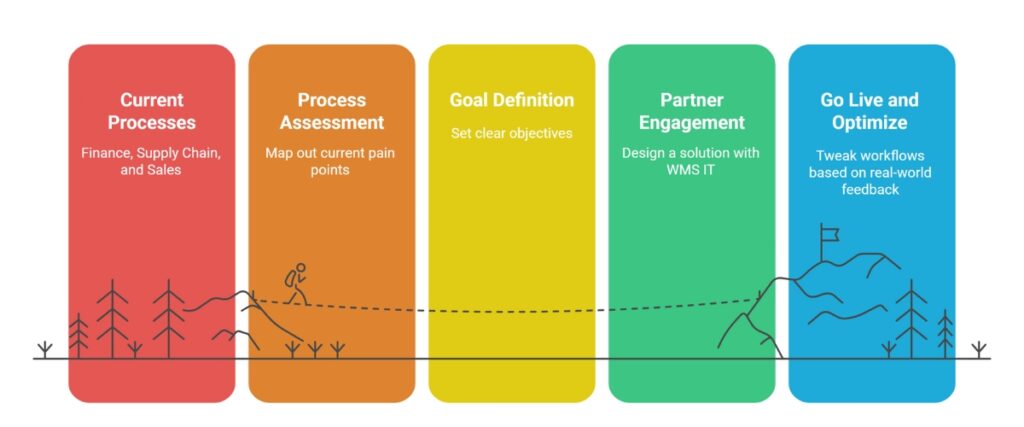
Step-by-Step Guide to Rapid Implementation

WMSIT banners

1. Assess your processes

Map out current pain points in finance, supply chain, and sales.

2. Define your goals

Set clear objectives: reduce month-end close by X days, cut stockouts by Y%.

3. Engage a partner

At WMS IT , we’ll help you design a solution that fits your business.

4. Configure and migrate

 Move your data into Business Central with minimal downtime.

5. Train your team

 Hands-on workshops ensure everyone knows how to use their dashboards and reports.

6. Go live and optimize

 Launch quickly, then tweak workflows based on real-world feedback.

Myths vs. Reality

Myth Reality
Only for big businesses Perfect for SMEs – Scales with you
Too complex Quick setup – Live in weeks
Too expensive Saves money – Replaces multiple systems
Hard to learn Intuitive design – Staff learn in hours

How a Melbourne Wholesale Distributor Transformed Operations With Business Central

A Melbourne-based wholesale distributor was managing 1,400+ SKUs across two warehouses using MYOB and Excel — with daily stock discrepancies, manual purchase order processing and a month-end close that took 8 days.

After implementing Business Central with Work Made Simple WMS:

“The biggest surprise was how quickly the team adopted it — by the end of week two, nobody wanted to go back.”
— Operations Manager, Melbourne Wholesale Distributor

Practical Tips You Can Apply Immediately

  • Automate three approvals: Set up workflow rules for purchase orders, expense claims, and time sheets this week.
  • Use smart reorder points: Identify your top 20 high-volume items and configure automatic restocking.
  • Build a dashboard: Create a simple cash-flow dashboard for daily review.

Trust & Advice

We’ve helped many businesses like yours—from family-owned distributors to national services firms—transform their operations with Business Central. Our philosophy is simple: technology should free you from hassles, not add to them. Whether it’s a full ERP rollout or a small custom add-on, we focus on streamlining your processes so you can grow, innovate, and delight customers every day.

Ready to simplify your operations and unlock real growth? DM us, book a free call, or visit our website to see how Business Central 365 can work for you: WMS: Work Made Simple . Let’s make work simple—together.

Start with a simple conversation. Let's discuss your specific challenges and how Business Central 365 Features to Streamline Operations Fast. No pressure, no hard sell – just an honest assessment of how we can help your business thrive.

Stay productive, stay focused, and watch your business soar!

Frequently Asked Questions (FAQs)

What are the top features of Dynamics 365 Business Central for Australian SMBs?

Financial management, real-time inventory, role-based dashboards, Power BI reporting, workflow automation and Microsoft 365 integration — covering every operational function in a single platform

BC includes multi-entity, multi-currency, project costing, manufacturing and full supply chain — capabilities that MYOB and Xero do not offer at scale

Yes — Copilot is embedded inside Business Central. It answers plain-English data questions, predicts cash flow, automates AP and generates purchase suggestions without a data analyst

Yes — Business Central supports unlimited warehouse locations with directed put-away, bin management, wave picking and mobile scanning via the Tasklet Factory extension

GST tax codes are applied automatically per transaction type. BAS summaries are generated directly in Business Central for quarterly ATO lodgement

Microsoft AppSource is a certified marketplace of 350+ extensions for Business Central — including LS Retail for retail, Continia for AP automation and Tasklet Factory for warehousing

Native integration with Outlook, Excel, Teams, Word and Power BI — create quotes from email, refresh reports live in Excel and approve transactions inside Teams

Yes — hosted on Microsoft Azure with 99.9% uptime, Australian data centre residency, multi-factor authentication, role-based access and full audit trail on every transaction

Yes — via AL development language and certified AppSource extensions. Business Central can be tailored for retail, manufacturing, distribution, food service and professional services

Work Made Simple (WMS) is a certified Microsoft Dynamics 365 Business Central partner in Australia. Contact us for a free discovery consultation tailored to your business

Let’s Connect

Tell us what you’re looking for, and our experts will reach out with the next steps.